
Hi there,
Welcome to this ConvertBox review, where we take a closer look at how this tool helps improve conversions and grow online businesses.
Conversion rate optimization plays a critical role in the success of any online business. Your conversion rate directly affects how many website visitors take meaningful action, such as signing up, requesting information, or making a purchase. When conversion rates are low, revenue potential declines, even if traffic is high. The good news is that proven tools and strategies are available to improve these results.
The Problem
A large portion of a marketer’s time, effort, and budget goes into driving traffic to a website. However, most visitors arrive, consume content, and leave without taking any action. This behavior makes much of that effort ineffective. If website visitors are not being engaged at the right moment with relevant messaging, valuable leads and potential sales are lost every day.
Choosing the right solution is not always straightforward. The market is crowded with conversion optimization and list-building tools, each promising better results. This variety can make it difficult to decide which platform truly fits your business needs, workflow, and long-term goals.
The Solution
To build a sustainable online business, it is essential to engage visitors based on their behavior and re-engage them with personalized offers. This requires reliable software that simplifies targeting, segmentation, and on-site engagement without adding technical complexity.
ConvertBox addresses this need by providing a unified platform for behavior-based on-site targeting, list growth, and opt-in management. Instead of relying on generic pop-ups, ConvertBox enables marketers to deliver relevant messages based on visitor intent, interactions, and timing. This approach helps ensure that offers feel contextual rather than disruptive.
Its flexibility and strong conversion-focused design make it capable of replacing multiple tools commonly used for pop-ups, opt-ins, and basic retargeting. By consolidating these functions into a single platform, ConvertBox helps streamline workflows while maintaining a personalized user experience.
As we continue through this ConvertBox review, we’ll explore its features in detail, examine how it performs in real-world use cases, and share insights to help you decide whether it fits your business goals and marketing strategy.
ConvertBox Review: A Quick Overview

ConvertBox is built for marketers who want more than basic pop-ups. Its flexibility becomes clear as soon as you explore how it can be used to capture leads, guide visitors through a sales funnel, and communicate offers or announcements across an entire website with precision.
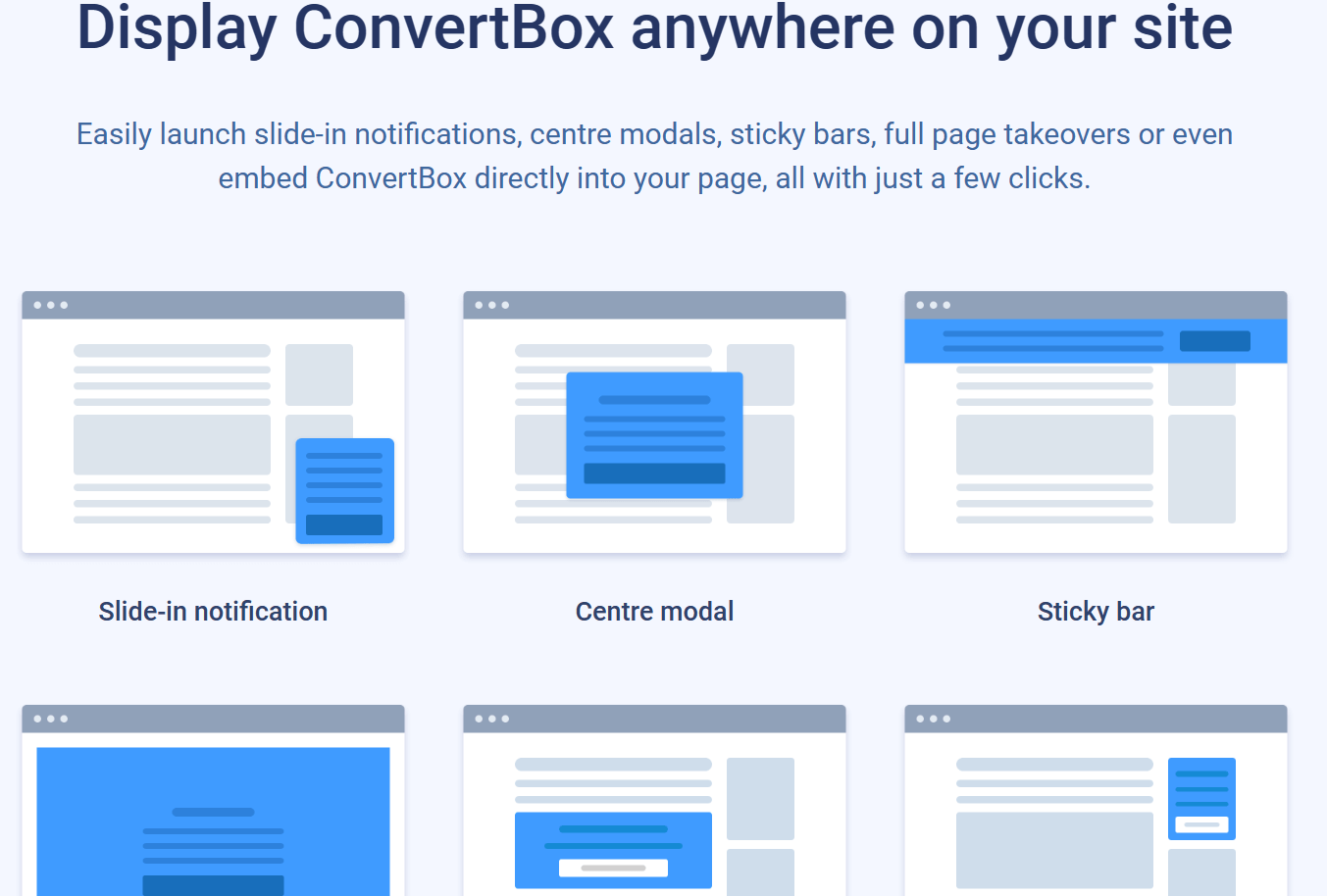
The platform lets you create a compact chat-style box that appears in the bottom-left or bottom-right corner of your site. This format works well for initiating conversations and collecting leads without interrupting the browsing experience. For more direct campaigns, ConvertBox includes ready-to-use templates for video messages, limited-time offers, lead magnets, and multi-step opt-in flows. Users can also build forms from scratch to match specific branding or campaign goals.
Customization is fast and straightforward. The editor allows any element to be edited, duplicated, or removed with a single click, which keeps the workflow efficient and beginner-friendly. This makes it easier to focus on improving conversions rather than dealing with technical setup.
ConvertBox also supports multiple display formats beyond standard pop-ups. Sticky bars remain visible at the top of the page for ongoing promotions, while full-page takeovers help deliver high-impact offers that demand attention when timing matters most.
Integration with popular CRM platforms, such as HubSpot, enables automatic capture and syncing of lead data. Each form field can be mapped directly to your CRM, ensuring clean data collection and smoother follow-up workflows.
For optimization, ConvertBox includes built-in A/B testing, allowing you to compare different opt-in variations and refine performance based on real user behavior. Live previews for desktop and mobile ensure every form looks and functions correctly across devices.
For marketers seeking a conversion-focused tool that combines flexibility, ease of use, and long-term value, ConvertBox fits well into a performance-driven lead-generation strategy.
About ConvertBox

ConvertBox is an email capture and on-site engagement tool built to help businesses convert website visitors into qualified leads and customers. It enables the creation of personalized landing pages, targeted opt-in forms, and structured sales funnels that improve conversion rates without adding complexity.
By using behavior-based on-site messaging and clean, visually appealing lead-capture forms, ConvertBox delivers opt-in experiences that feel relevant rather than disruptive. Visitors see offers aligned with their intent and interactions, increasing engagement, improving lead quality, and supporting stronger campaign performance across the site.
ConvertBox Features
ConvertBox comes packed with a wide range of powerful features and continues to expand its capabilities over time. The platform has evolved beyond simple opt-in forms and now supports advanced lead-generation methods, including interactive quizzes and behavior-driven funnels. Below are the key features you can use with ConvertBox to improve engagement and conversions.
1) Segmentation Funnels
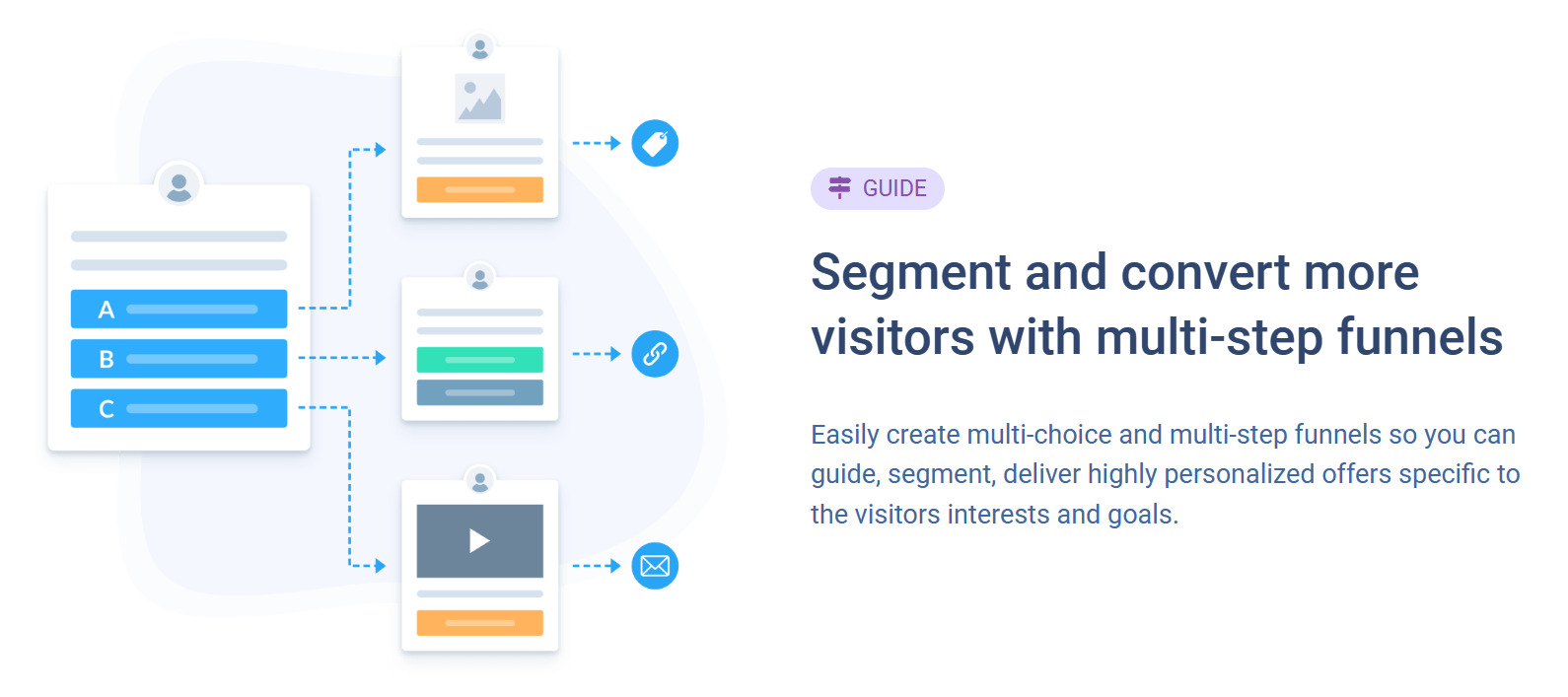
ConvertBox allows you to segment your audience with precision, ensuring that visitors see offers aligned with their interests and goals. Its multiple-choice segmentation funnels let you categorize and tag users based on their selections before presenting any offer. This approach helps deliver highly personalized messaging, improves lead quality, and increases the likelihood of conversion by matching offers to visitor intent.
2) Engage On-Site Messages
ConvertBox makes it easy to engage visitors directly on your website using targeted on-site messages. You can present exit-based offers to shoppers abandoning their carts, send discount coupons to returning customers, or run time-sensitive promotions that encourage immediate action. These messages are triggered by behavior and timing, helping boost conversions without disrupting the user experience.
3) A/B Split Testing
With built-in A/B split testing, ConvertBox allows you to create multiple variations of your opt-in forms and funnels to determine what performs better. Using the visual editor, you can design different layouts, messages, and calls to action, then compare results using real-time data. This makes it easier to optimize conversions before and after publishing campaigns.
4) Embedded Forms

ConvertBox supports both large and compact embedded forms that can be placed directly within your page content. These forms work well for content-specific opt-in offers that align with the topic of a blog post or landing page. Embedded forms can also be added to widget areas such as sidebars, giving you flexibility in how and where lead capture appears.
5) Tracking and Performance Insights
ConvertBox provides detailed tracking data to help optimize opt-in performance. You can monitor views, interactions, and leads across individual ConvertBoxes or grouped campaigns. The platform also enables performance comparisons across models, specific groups, or split-test variations, helping you make data-driven decisions to improve results over time.
Convertbox is loaded with powerful features and functions and has been significantly expanding its feature set. It can now create quite intricate quizzes for lead generation. Here are all the features you can utilize with ConverBox.
Convertbox User Interface
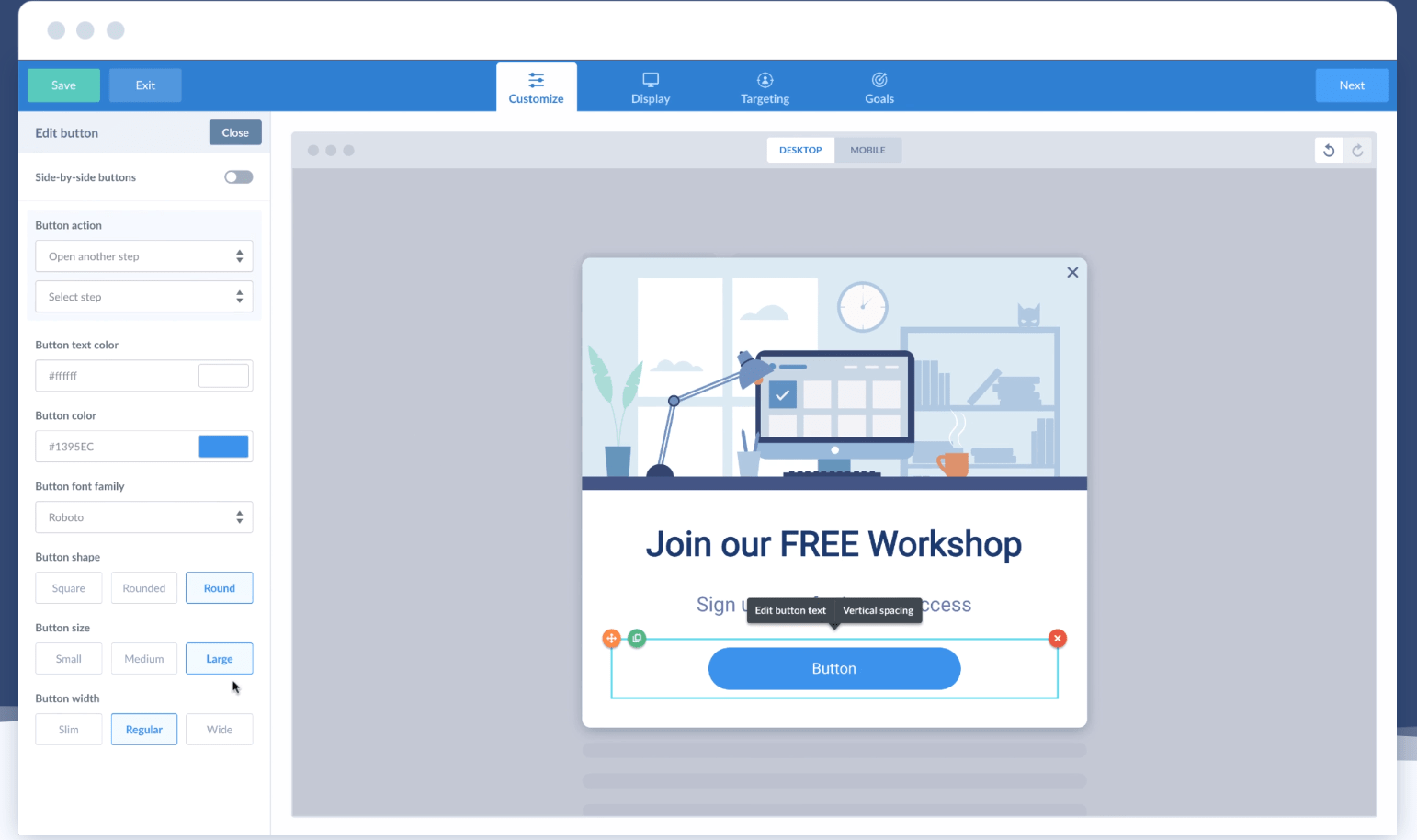
After installing any software, the next thing users usually notice is the design, particularly the user interface (UI) and overall user experience (UX). ConvertBox performs strongly in this area with a dashboard that feels clean, modern, and intuitive. For users who value simplicity and ease of navigation, the interface feels welcoming from the first login.
Once inside the dashboard, you get a clear, high-level view of user activity and interactions. Important data is easy to access without digging through multiple menus. As you create new ConvertBoxes or groups, the dashboard remains organized rather than cluttered. Unwanted or inactive groups can be removed by dragging them to the bottom, ensuring active ConvertBoxes and priority groups remain visible at the top.
This flexible layout helps maintain focus and keeps daily workflows efficient, especially when managing multiple campaigns. You spend less time organizing and more time optimizing performance.
ConvertBox also provides a straightforward process for creating groups and building forms. The form builder is designed to feel smooth and responsive, making it easier to complete essential tasks without frustration. Even repetitive setup work feels manageable because the interface removes unnecessary complexity.
Overall, ConvertBox delivers a user experience that supports productivity. Its thoughtful design makes form creation and campaign management feel approachable, which is especially valuable for marketers who want powerful functionality without a steep learning curve.
Lead Generation Modal
With its built-in form builder, ConvertBox lets you capture leads directly through pop-ups or engage visitors by asking questions and presenting multiple response options. Instead of forcing an immediate opt-in, you can start a conversation and guide visitors through choices that feel natural. This approach makes lead generation feel simple and intentional rather than intrusive.
Creating a lead-generation modal begins with assigning it to a group and giving it a clear name. Each modal must belong to a group to keep campaigns structured and easy to manage. Groups act as containers that organize your ConvertBoxes, making it faster to locate specific campaigns and understand how they fit into your overall strategy.
This grouping system also makes performance tracking easier. You can quickly see how a specific lead magnet or offer is performing across all associated ConvertBoxes, which is useful for reporting and optimization. Instead of reviewing scattered data, results are centralized and easy to interpret.
A standout use of this builder is the ability to ask visitors qualifying questions. For example, you can ask whether someone is more interested in increasing traffic or improving conversions. Based on their selection, ConvertBox can move them into a different funnel step with a tailored offer or lead magnet that matches their preference.
These multi-step flows allow you to build detailed funnels that adapt to user input. Each response can trigger a different path, enabling highly personalized experiences. Funnels can include multiple steps and function much like an interactive quiz, helping segment visitors while collecting valuable insights.
This flexibility makes ConvertBox especially useful for marketers seeking deeper engagement and higher-quality leads, rather than collecting generic email addresses with a single static form.
ConvertBox Pricing

ConvertBox is currently available through a discounted lifetime access deal, allowing users to unlock all premium features for a one-time payment of $495. This pricing structure eliminates recurring monthly or annual fees, making it easier to plan long-term marketing costs without ongoing subscriptions.
Because ConvertBox is still in beta and preparing for a wider release, monthly or annual subscription plans are not available at this time. While future pricing models may be introduced later, the current lifetime offer provides early access at a fixed cost. Based on the lifetime pricing, any upcoming subscription plans are expected to remain reasonably priced, but the lifetime deal offers the most predictable value.
This plan is designed for marketers and businesses that want full access without recurring payment limitations. Once purchased, you retain access to the platform and its updates at no additional cost.
What’s included in the ConvertBox lifetime plan
- Single one-time payment with no renewals
- No monthly or annual fees at any stage
- Usage across up to 10 websites
- Allowance of 250,000 views per month
- Complete removal of ConvertBox branding
- Access to technical support when needed
- Ability to create unlimited ConvertBoxes
- Free platform updates as new features are released
This pricing model works well for users who prefer long-term ownership over subscriptions. It also suits businesses looking to consolidate tools while maintaining control over costs as their traffic and campaigns grow.
Check out the detailed version here 👉ConvertBox Pricing.
Why do we recommend ConvertBox?
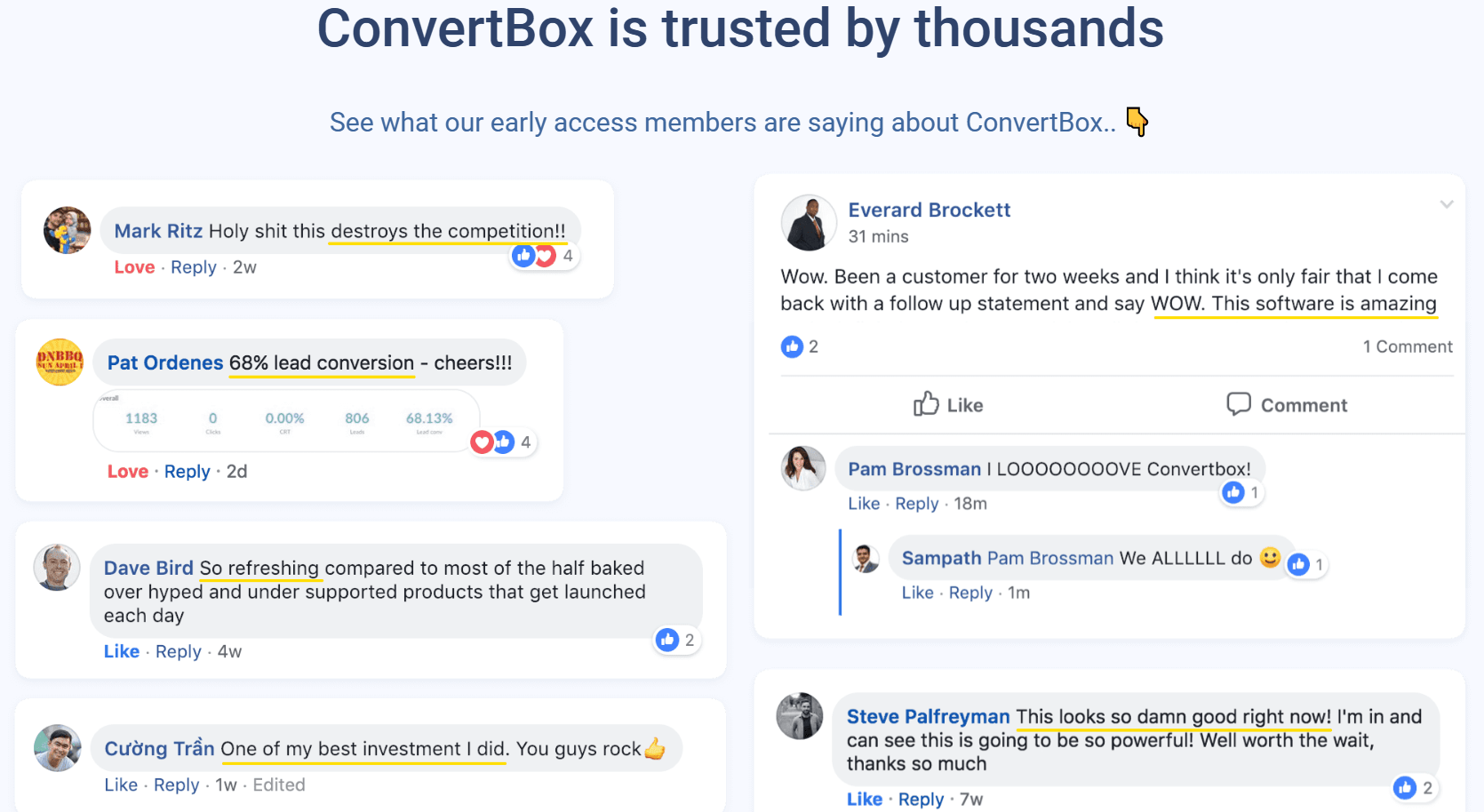
ConvertBox is a powerful lead-generation and on-site engagement tool built for online marketers and growing businesses. Its strength comes from a combination of simplicity and advanced functionality, allowing users to create targeted opt-in experiences without technical friction. A major advantage that sets ConvertBox apart is its deep integration with HubSpot and other CRM platforms, making lead management and follow-up workflows more efficient.
Easy to Use
ConvertBox is designed with usability in mind. The drag-and-drop visual editor allows you to design, customize, and test everything in a single interface. From layout and styling to personalized messaging and call-to-action behavior, every element can be adjusted visually without touching code.
All features are organized clearly within one dashboard, making it easy to manage campaigns, forms, and performance data without feeling overwhelmed. This structured setup helps users stay productive even when running multiple ConvertBoxes across different pages or websites.
Targets Visitors Intelligently
ConvertBox focuses on relevance rather than generic messaging. Instead of showing the same opt-in to every visitor, it delivers tailored messages based on behavior, site activity, referral source, and available CRM or ESP data. Visitors are guided toward offers that align with their intent, creating a more personalized experience that improves engagement and conversion rates.
This intelligent targeting helps reduce friction and ensures visitors see offers that feel timely and context-aware rather than disruptive.
Flexible Custom Form Fields
ConvertBox offers extensive flexibility for form customization. You can create email capture forms using multiple layouts, including full-page takeovers, modals, sticky elements, and embedded forms. Each form can be customized with different fields and design options based on campaign goals.
Collected data is automatically sent to your connected CRM or email service provider, keeping lead information organized and ready for follow-up. This streamlined data flow removes manual work and supports cleaner automation.
Track Everything Effortlessly
ConvertBox includes real-time statistics and performance insights for every part of your campaigns. You can track views, interactions, and leads across individual ConvertBoxes or grouped campaigns. This visibility allows you to test different messages, layouts, and funnels, then refine each step based on actual results.
By continuously optimizing using real data, marketers can improve return on investment without relying on guesswork.
Seamless Integration with Third-Party Tools
ConvertBox integrates smoothly with essential marketing tools, including page builders, autoresponders, CRM systems, and shopping carts. These integrations enable seamless data flow between platforms, supporting automation and advanced funnel logic.
The integration library continues to expand, ensuring ConvertBox remains compatible with modern marketing stacks and adapts to evolving workflows without forcing users to change existing tools.
Frequently Asked Questions
1. What is ConvertBox used for?
ConvertBox is used to capture leads, segment website visitors, and display personalized on-site messages. It helps marketers turn traffic into subscribers or customers using behavior-based targeting, multi-step funnels, and customizable opt-in forms without relying on code.
2. Is ConvertBox suitable for beginners?
ConvertBox is well-suited for beginners because it offers a visual drag-and-drop editor and a clean dashboard. While advanced features such as segmentation funnels exist, basic opt-in forms and lead-capture campaigns can be set up quickly with minimal learning curve.
3. How does ConvertBox improve conversion rates?
ConvertBox improves conversion rates by showing relevant offers based on visitor behavior, page activity, and interaction history. Instead of generic pop-ups, users see context-aware messages, which increase engagement, lead quality, and overall campaign effectiveness.
4. Does ConvertBox integrate with email marketing and CRM tools?
ConvertBox integrates with popular email marketing platforms and CRM tools, including HubSpot. Lead data is automatically synced, allowing marketers to build automated follow-ups, segment contacts, and manage campaigns efficiently without manual data handling.
5. Is ConvertBox worth the lifetime price?
ConvertBox can be worth the lifetime price for marketers and businesses planning long-term use. The one-time payment eliminates recurring fees and provides access to advanced targeting, analytics, and personalization features that often require multiple tools or ongoing subscriptions.
Also Read,
Conclusion – ConvertBox Review
The ConvertBox team has clearly focused on building a practical and well-structured tool. ConvertBox allows you to create different types of pop-ups and on-site messages, collect email addresses, and guide visitors toward relevant offers without adding unnecessary complexity. The workflow feels intentional and easy to manage, even when running multiple campaigns.
Integration with commonly used CRM platforms helps keep lead data organized and ready for follow-up. Combined with a clean interface and flexible targeting options, ConvertBox fits naturally into a conversion-focused setup without requiring constant adjustments or technical work.
Further Recommendation:
