
Building a strong email list is one of the most powerful ways to increase sales, nurture leads, and grow long-term relationships with your audience. However, converting website visitors into subscribers isn’t always easy. Many users ignore traditional opt-in forms, considering them intrusive or distracting. This is where advanced tools like ConvertBox and Thrive Leads come into play, offering smarter, more engaging ways to capture leads without compromising the user experience.
Both ConvertBox and Thrive Leads are well-known list-building tools, but they approach lead generation differently. Choosing the right one depends on your goals, website setup, and level of marketing experience.
In this article, I’ll provide a detailed comparison of ConvertBox vs Thrive Leads, breaking down their core features, design templates, visual editors, targeting options, integrations, analytics, tracking capabilities, and customer support. Each aspect is analyzed to help you understand how these tools perform in real-world email marketing scenarios.
Additionally, we’ll explore which type of users benefit most from each platform, whether you’re a beginner, blogger, agency owner, or advanced marketer focused on conversions and automation.
By the end of this comparison, you’ll have a clear understanding of which tool aligns best with your email list-building strategy and business needs. Let’s get started.
You can also read the detailed review of ConvertBox by clicking here.
What is Convertbox?
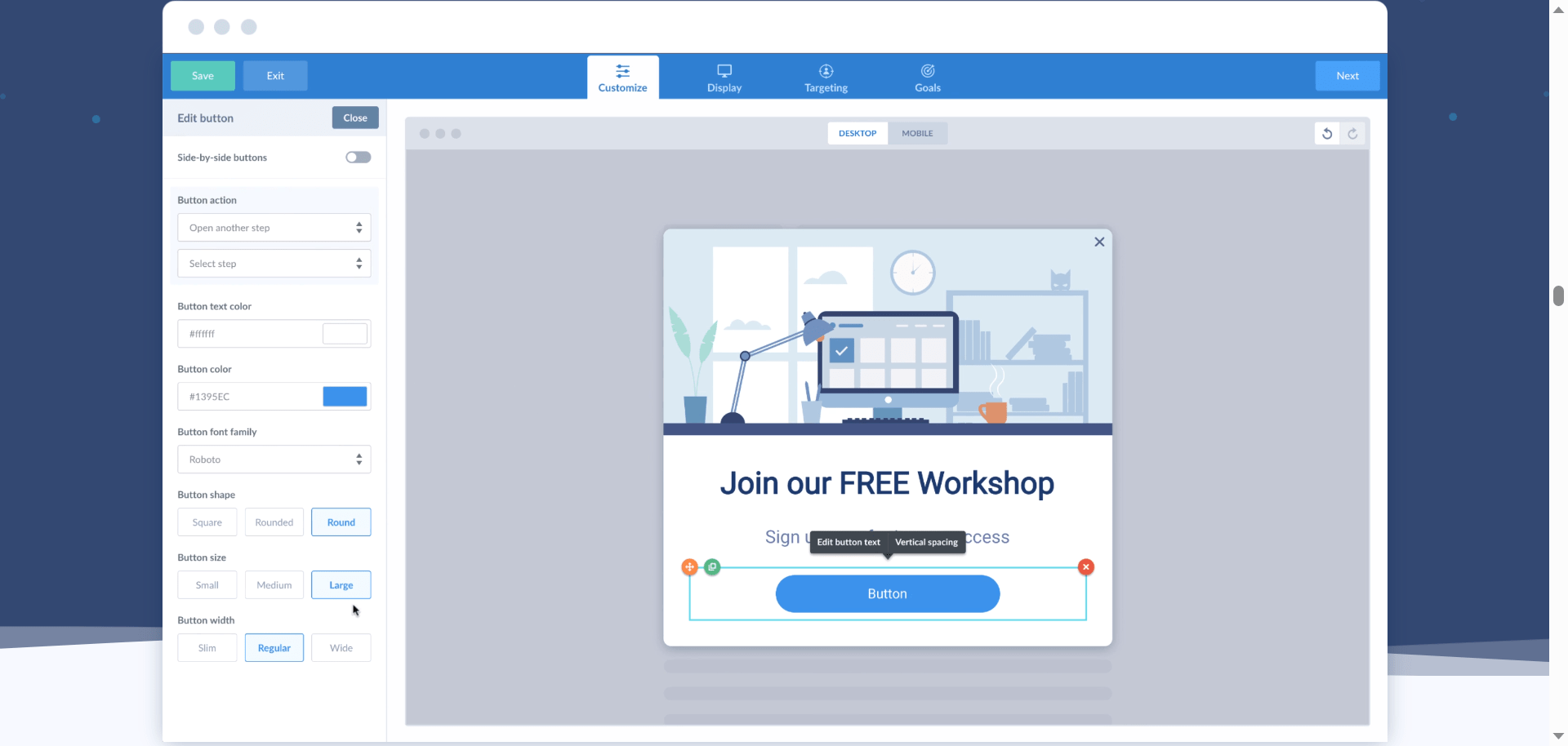
ConvertBox is an online lead generation and list-building tool designed to help businesses capture more leads and improve conversions from website traffic. It focuses on converting visitors into subscribers through highly customizable opt-in forms that blend naturally into the user experience rather than interrupting it.
The platform allows users to create and edit interactive opt-in widgets known as ConvertBoxes. With a collection of fully customizable templates, users can design forms that align with their brand identity, messaging, and conversion goals, without requiring coding or advanced technical skills.
ConvertBox excels at audience targeting and segmentation by supporting multi-step funnels and multiple-choice opt-in flows. These features make it easier to segment visitors by behavior, interests, or responses, enabling marketers to deliver more relevant content and personalized offers.
To further strengthen personalization, ConvertBox provides dynamic opt-in forms and built-in support for on-site quizzes and surveys. These tools help collect valuable user data, improve segmentation accuracy, and enable targeted offers tailored to each visitor.
ConvertBox also offers strong flexibility for businesses managing multiple websites. A single subscription can be used across up to 50 domains, making it a practical solution for agencies, entrepreneurs, and growing companies that need centralized lead generation across several online properties.
Comparing ConvertBox vs Thrive Leads Features
1) Visual Editors
ConvertBox’s visual editor has undergone significant improvements, resulting in a clean, modern, and intuitive interface. All drag-and-drop elements are neatly placed on the left side, while core editing controls remain easily accessible at the top of the editor. This layout keeps the workspace organized and reduces unnecessary distractions during form creation.
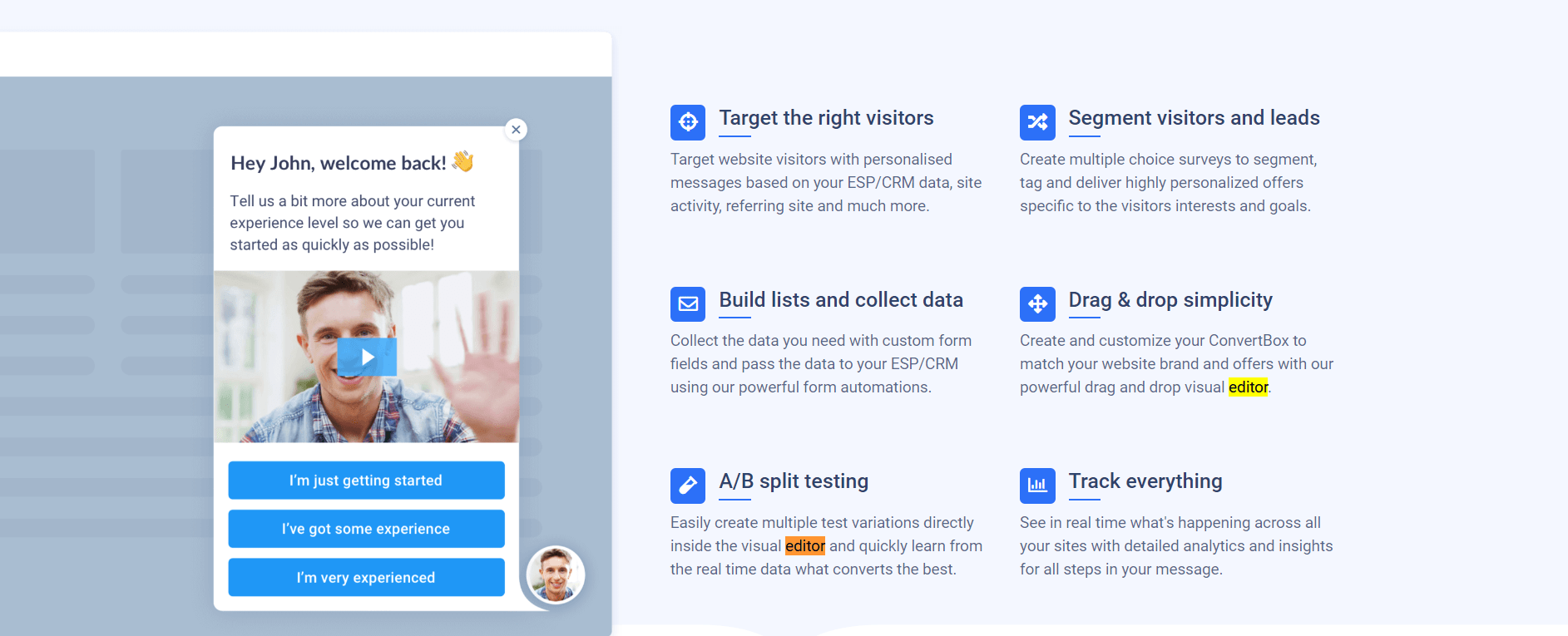
Editing any element requires just a single click, making customization fast and efficient. The built-in undo and redo options allow users to move smoothly between changes, encouraging experimentation with layouts, copy, and design without the fear of losing progress. This streamlined workflow makes it easy to test different template formats and design variations without ever leaving the editor.
Overall, ConvertBox’s visual editor delivers a smooth and efficient experience. It balances flexibility with simplicity, allowing users to create high-converting opt-in forms while maintaining a clear and distraction-free workflow.
Thrive Leads approaches visual editing differently. The page editor can feel overwhelming because of the large number of options displayed in the left, right, and top panels. While these options offer deep control, the crowded interface can make the editing process feel more demanding, especially for users who prefer a cleaner layout.
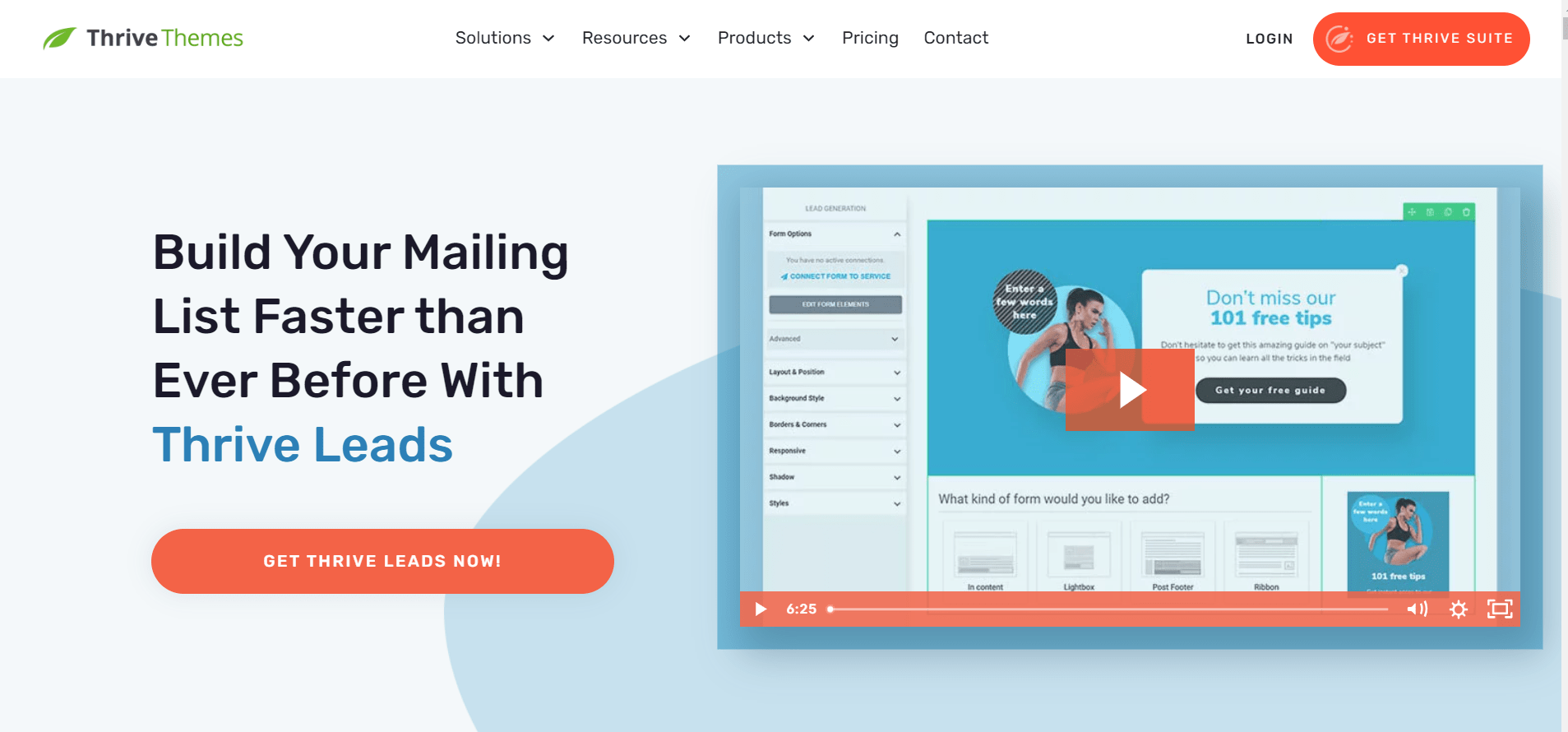
Another challenge with Thrive Leads is implementation. Adding ThriveBoxes to a website often requires copying and embedding code. Depending on the WordPress theme being used, this process can become complicated and time-consuming. Although Thrive Leads provides guidance and explanations, the frequent workflow interruptions can feel confusing and slow down the overall setup process.
From a usability perspective, ConvertBox stands out for its simpler interface and more intuitive editing experience, especially for users who want speed and clarity without technical friction.
2) Template Effectiveness and Conversion Prospects
ConvertBox offers a collection of fully editable templates designed to deliver highly targeted messages to specific audience segments. Templates are clearly labeled, categorized, and well-organized, making it easy to find the right format for different marketing goals. Their visual style feels modern and conversion-focused, helping opt-in forms blend naturally into contemporary websites.
A key strength of ConvertBox templates is their alignment with user segmentation. The platform emphasizes presenting offers that match visitor behavior and intent. For example, limited-time or subscriber-only templates can be shown to existing users, encouraging conversions rather than letting visitors leave the page without taking action. This approach keeps messaging relevant and focused on driving sales.
Thrive Leads templates may appear basic at first glance, but they reveal strong functionality during deeper use. These templates support custom fields, allowing marketers to collect advanced data such as tags and behavioral attributes. This added layer of information helps create precise audience segments and improves the effectiveness of follow-up campaigns.
Thrive Leads also includes an “already subscribed” option within its templates. When paired with smart links, this feature enables intelligent targeting for existing subscribers and helps build structured sales funnels without showing redundant opt-in messages.
Both ConvertBox and Thrive Leads provide editable templates that support deep customization and segmentation. Each platform places strong emphasis on personalized messaging to improve engagement and conversions, though it does so through different design philosophies and workflows.
ConvertBox vs Thrive Leads: Setup Experience
ConvertBox: Straightforward and User-Centric
ConvertBox delivers a setup experience that feels clean, intuitive, and visually well-structured. The interface is easy to navigate, with a minimal design that keeps attention on essential areas such as Stats and Your ConvertBoxes, helping users stay focused without unnecessary clutter.
A practical feature within ConvertBox is the ability to organize opt-in forms into Groups. This makes it easy to save, categorize, and manage multiple ConvertBoxes, especially for users running several campaigns at once. The overall layout supports quick access to active projects while keeping the dashboard uncluttered.
Template selection in ConvertBox is also simplified through clear classification. Templates are divided into two main categories: Popup and Overlay. Within the Overlay section, users can choose from formats such as Center Modal, Callout Modal, Sticky Bar, and Full Page. This structured approach significantly improves usability by reducing the time spent searching for the right template.
Customization is handled through a smooth visual editor that removes friction from the workflow. Actions such as duplicating or cloning a previous step are seamless, eliminating the need to repeatedly select and modify templates from scratch. This saves time and allows users to focus on optimization rather than setup.
ConvertBox also supports managing multiple websites from a single account. A simple dropdown menu lets users switch between domains without logging in and out, making it convenient for agencies and businesses handling several sites.
With its clean interface, smart organization, and efficient editing flow, ConvertBox provides a setup experience that feels polished and easy to use.
Thrive Leads: Complicated Yet Structured
Thrive Leads, available as a WordPress plugin, shares some structural similarities with ConvertBox, particularly in how essential elements are presented on the dashboard. Alongside core features, Thrive Leads includes additional components such as Signup Segue and Lead Shortcodes, which are required for full functionality.
The platform emphasizes organization by dividing features into Segue, Lead Shortcodes, ThriveBoxes, and Lead Groups. This structured layout helps define different use cases clearly, though it also adds complexity to the overall setup process.
Due to its dense layout and extensive scrolling, Thrive Leads can feel overwhelming, especially during initial use. Accessing all available settings often requires navigating through multiple screens, which can slow down the workflow.
To make this easier, Thrive Leads includes call-out explanations that guide users through each step. Even so, workflow interruptions can occur frequently. For example, clicking “Edit” on a step often redirects users through several intermediate pages before reaching the template editor, which may feel inefficient.
Using the page editor for ThriveBox design generally provides a more logical, smoother editing experience than other editing paths within the plugin.
Although the learning curve with Thrive Leads is steeper, usability improves once users become familiar with the editor and workflow structure.
Verdict
ConvertBox performs better in this segment due to its cleaner setup process, intuitive interface, and faster workflow.
ConvertBox vs Thrive Leads: Integration with WordPress
ConvertBox and Thrive Leads both support WordPress integration, but they follow different workflows and offer different levels of flexibility.
ConvertBox Integration
ConvertBox supports API-based integrations that allow seamless connections with email marketing platforms, CRMs, and autoresponders without requiring manual code insertion. Integrations can be managed directly from the account settings, making the initial setup simple and efficient.
Beyond global settings, ConvertBox also allows integrations to be configured inside multi-step funnels. This provides greater control by letting users assign different integrations to specific opt-in forms or funnel steps. This approach is especially useful when testing multiple autoresponders, running segmented campaigns, or delivering personalized follow-ups.
For WordPress websites, ConvertBox offers a dedicated plugin called ConvertBox Auto Embed. Once installed and activated, the plugin automatically enables ConvertBoxes across all website pages, eliminating the need for additional setup.
ConvertBox can also be installed by adding a script directly to the website. This method works well when collaborating with a developer, as it allows ConvertBox to be implemented alongside other custom scripts or site-level configurations.
In addition to WordPress, ConvertBox supports HTML and Webhook integrations. These options provide extended flexibility when connecting with tools that are not natively supported, making ConvertBox suitable for advanced setups and custom workflows.
Thrive Leads Integration
Thrive Leads is a native WordPress plugin that integrates directly with WordPress websites. It uses API-based connections to integrate with email services and autoresponders, keeping the process code-free.
Before creating opt-in forms, users must first integrate all required Thrive Leads services. This means obtaining an API key from the selected email or autoresponder platform and completing the guided integration process inside the plugin settings.
Once integrations are configured, they become available across opt-in forms and campaigns. While the setup process is straightforward, integrations must be completed in advance, reducing flexibility when testing multiple tools simultaneously.
Verdict
ConvertBox performs better in this segment due to its flexible integration options, funnel-level customization, and support for WordPress, HTML, and Webhook-based implementations.
ConvertBox vs Thrive Leads: Data Transfer
Data transfer is critical when connecting lead-generation tools to other marketing platforms. In practice, this means sending opt-in data from ConvertBox or Thrive Leads to external services, including Google Analytics, email autoresponders, checkout systems, and customer relationship management (CRM) platforms. These connections help track user behavior, improve attribution, and automate follow-up actions.
ConvertBox Data Transfer
ConvertBox allows opt-in and interaction data to be passed to integrated services once connections are established. For example, if Google Analytics is connected, lead data and user actions can be shared to improve conversion tracking and campaign analysis. The same applies when working with email marketing tools, CRMs, or checkout platforms.
While the functionality is available, configuring data transfer requires careful setup. Users need to define which data points are shared and how they are mapped across platforms. ConvertBox provides detailed documentation and step-by-step guides to simplify this process. For advanced use cases or custom data handling, working with a developer can make the setup smoother and more reliable.
Thrive Leads Data Transfer
Thrive Leads also supports transferring opt-in data to connected services, including analytics tools, autoresponders, and CRM systems. Once integrations are in place, collected lead information can be routed to external platforms for tracking, segmentation, and automation.
Similar to ConvertBox, the setup process involves multiple steps and may feel complex at first. Thrive Leads addresses this by offering clear tutorials and explanations that walk users through the configuration process. When custom tracking or advanced integrations are required, developer assistance may still be helpful.
Verdict
Both ConvertBox and Thrive Leads handle data transfer effectively and provide documentation to guide users through setup. Since each platform supports sending opt-in data to external services with comparable complexity and guidance, performance in this segment remains evenly matched.
ConvertBox vs Thrive Leads: Analytics and Tracking
Analytics and tracking play a key role in understanding how well opt-in forms perform and where improvements are needed. Both ConvertBox and Thrive Leads offer reporting tools to measure conversions, engagement, and list growth.
ConvertBox Analytics and Tracking
ConvertBox displays real-time performance data directly inside the dashboard. Users can view high-level activity in the Activity section, which presents key metrics such as views, interactions, and leads in an easy-to-read table format. This overview is helpful when quick insights are needed without digging into detailed reports.
For deeper analysis, the Stats tab provides more detailed performance data for individual ConvertBoxes or entire groups. These reports enable users to evaluate how specific forms or campaigns perform over time, making it easier to identify what is working and what needs optimization.
ConvertBox focuses on clarity and accessibility, ensuring performance data is accessible without overwhelming users with unnecessary complexity.
Thrive Leads Analytics and Tracking
Thrive Leads offers a more detailed reporting system with multiple layers of insights. In addition to dashboard summary reports, it provides granular conversion reports that highlight lead-generation performance and conversion trends over time.
A notable feature is the list growth report, which tracks how an email list expands over a given period. This report serves as a strong indicator of overall form effectiveness and long-term list-building success. Thrive Leads also supports A/B testing, allowing users to compare variations and refine opt-in forms based on data-driven results.
Verdict
Both ConvertBox and Thrive Leads deliver reliable analytics and tracking capabilities. Each platform provides clear performance reports and actionable data, making them equally effective in this segment.
ConvertBox vs Thrive Leads: Creating Customized Offers
Customized offers help increase relevance and conversions by matching messaging to visitor intent. Both platforms support form customization, but they differ in how deeply personalization can be implemented.
ConvertBox Customized Offers
ConvertBox allows users to create multi-choice, multi-step funnels, enabling advanced visitor segmentation before presenting an offer. Visitors can be categorized and tagged based on their responses, behavior, or selections, ensuring they see offers aligned with their interests and goals. This approach improves relevance and increases the likelihood of conversion.
Multi-step funnels can be built directly inside the page editor by clicking “Add New Step.” To speed up the process, users can clone existing steps, avoiding the need to switch repeatedly between different templates or formats. This keeps the workflow efficient and consistent.
ConvertBox also allows users to define rules for visitor actions when a call-to-action button is clicked. These rules determine what happens next in the funnel, providing precise control over user journeys and offering delivery.
Thrive Leads Customized Offers
Thrive Leads supports customized opt-in forms through presentation settings, targeting rules, and display conditions. Users can control when and where forms appear, as well as which audience segments see them. While this provides solid customization options, the process relies more on predefined rules than on dynamic, multi-step interaction flows.
Verdict
ConvertBox performs better in this segment due to its advanced multi-step funnel capabilities and flexible offer personalization. While both tools support customized forms, ConvertBox delivers greater control over visitor segmentation and offers relevance.
Exclusive ConvertBox Tools
ConvertBox includes several built-in tools focused on interaction, speed, and dynamic personalization, making it well-suited for advanced lead segmentation and behavior-based marketing.
Quizzes and Interactive Funnels
ConvertBox supports interactive elements such as on-site quizzes and multi-choice steps, allowing visitors to self-segment based on their responses. These quizzes feed directly into multi-step funnels, helping deliver personalized offers and follow-ups that align with visitor intent.
Quick Cloning
Quick cloning allows users to duplicate entire ConvertBoxes or individual funnel steps instantly. This feature accelerates campaign creation by eliminating the need to rebuild layouts, copy, or logic from scratch, which is especially helpful when testing variations or rolling out similar campaigns across multiple pages.
Conveyor (Multi-Step) Flows
ConvertBox uses conveyor-style, multi-step flows that guide visitors through a sequence of actions. Each step can be conditional, meaning what a visitor sees next depends on their previous interaction. This structure enables advanced targeting and tagging, and offers personalization within a single opt-in experience.
Conditional Logic and Personalization
ConvertBox allows conditions based on user behavior, referral source, or previous interactions. This enables real-time personalization, ensuring visitors see messaging and offers that feel relevant rather than generic.
Exclusive Thrive Leads Tools
Thrive Leads focuses heavily on structured list building in WordPress and offers several tools to manage multiple opt-in strategies at scale.
Thank-You Message Redirects
Instead of requiring a separate thank-you form or page, Thrive Leads allows users to display a thank-you message or redirect immediately after signup. This simplifies funnel setup and keeps visitors engaged without additional design steps.
Lead Groups
Lead Groups allow users to create and deploy multiple opt-in forms across the same website simultaneously. Each group can target different posts, pages, categories, or visitor conditions, making it easier to control where and when forms appear.
Lead Shortcodes
Thrive Leads provides shortcodes that allow opt-in forms to be placed precisely within content, sidebars, or custom sections of a page. This gives users more control over form placement without relying entirely on popups or overlays.
SmartLinks
SmartLinks prevent existing subscribers from seeing opt-in forms again. Instead, subscribed users can be redirected to alternative offers or content, improving user experience and supporting cleaner funnel progression.
Asset Delivery
Thrive Leads includes built-in asset delivery, allowing lead magnets such as PDFs or files to be delivered automatically after signup. This removes the need for third-party delivery tools for basic lead magnet workflows.
ConvertBox vs Thrive Leads: Pricing
Pricing plays a major role when choosing a lead-generation tool, especially for businesses planning long-term use.
ConvertBox Pricing
ConvertBox uses a lifetime pricing model, eliminating the need for monthly or annual subscriptions. At present, ConvertBox offers lifetime access for a one-time payment of $495, with no recurring fees. This includes access to core features and future updates.
Users can optionally upgrade to ConvertBox Pro for an additional $95 lifetime fee. This upgrade increases the monthly view limit, enables multiple sub-users, and supports use across up to 50 websites, making it suitable for agencies and client-focused businesses.
Compared with ConvertBox’s standard pricing of $99 per month or $1,188 per year, the lifetime deal offers substantial long-term value. ConvertBox does not offer a free trial, but it includes a 30-day money-back guarantee, allowing users to request a refund if the tool does not meet expectations.
Thrive Leads Pricing
Thrive Leads follows a subscription-based pricing model. It is available as part of the Thrive Suite, which includes Thrive Leads along with other conversion-focused WordPress tools.
According to the official Thrive Themes pricing page, Thrive Suite is offered through:
- a yearly subscription, or
- a quarterly subscription
Both plans include access to Thrive Leads, ongoing updates, support, and usage on up to 25 websites while the subscription remains active. If the subscription is not renewed, access to updates and premium templates is discontinued.
Thrive Leads also includes a 30-day refund policy, allowing users to try the product risk-free.
Verdict
ConvertBox offers better value for users seeking a one-time investment with no recurring costs. Thrive Leads may suit users who prefer a subscription model and want access to a broader WordPress-focused toolset through Thrive Suite.
Also, Read:
- ThriveCart Vs Stripe: Which is Better?
- OptinMonster Vs ConvertBox: Which is Best?
- Thrive Leads Vs ConvertBox: Which is Best?
Final Verdict: ConvertBox vs Thrive Leads
In a direct comparison between ConvertBox and Thrive Leads, ConvertBox emerges as the stronger overall choice due to its flexibility, ease of use, and advanced personalization capabilities. The platform is designed to help marketers deliver relevant offers at the right moment by using intelligent targeting based on visitor behavior.
ConvertBox uses meaningful user data, such as visit frequency, time spent on pages, traffic sources, and interaction patterns. This data-driven approach allows offers to feel timely and relevant rather than generic, which directly improves conversion potential. Combined with its visual workflow and multi-step funnels, ConvertBox provides greater control over how visitors are segmented and guided toward specific actions.
Thrive Leads remains a capable solution for WordPress users who prefer a plugin-based approach and structured opt-in management. However, its heavier interface, dependence on WordPress, and subscription-based pricing make it less flexible compared to ConvertBox.
Key Takeaway: Choose ConvertBox if
- You are comfortable with the current one-time lifetime payment of $495, instead of ongoing subscriptions
- You prefer a no-code solution that works without manual script handling
- Advanced segmentation and deep customization are important for your marketing strategy
- You value a clean, intuitive interface that reduces setup time
- You manage multiple websites or client projects and want centralized control
For marketers, creators, and agencies focused on long-term value, flexibility, and conversion-driven personalization, ConvertBox offers a more future-proof solution when compared directly with Thrive Leads.
Key Finding: Select Thrive Leads if:
Your preferred payment cycle is quarterly or annually.
A great option if you have limited websites.
Planning to go for Thrive Suite.
You want more choices for A/B testing.
You don’t feel at ease with coding.
