
Disclosure: Some links in this article are affiliate or sponsored links. If you buy through them, we may earn a commission at no extra cost to you. Our opinions are our own.
Incogniton is a Chromium-based anti-detect browser that keeps each account in its own browser profile with a separate fingerprint. Its listed plans start at $13.99 per month on a six-month billing cycle, and the site also offers a Try for FREE option so you can test it before paying.
The digital world today is transforming, and with the rapid advancement of the internet, the online privacy and security of web browsers have become more vulnerable because almost every single browsing activity of ours is being tracked or detected. While most people prefer established browsers like Google Chrome, Mozilla Firefox, Microsoft Edge, or Opera Mini, these browsers offer little protection against detection by other sources, putting your personal information at risk.
To protect their online identities and prevent monitoring and profiling, anti-detect browsers have become popular, secure internet-browsing solutions.
What is an Anti-detect Browser?

An anti-detect browser works much like a regular web browser, but it gives users more control over how their online identity appears to websites. Each browser profile can have its own digital fingerprint, including details such as browser settings, operating system information, and screen resolution. These profiles help keep different online accounts separate, reducing the chances of websites linking them to the same user. For someone managing several business accounts or running advertising campaigns, this can make everyday work much easier.
Anti-detect browsers also come in handy when accessing websites that display different content based on location. By combining separate browser profiles with compatible proxies, users can work with different regional versions of a website without constantly changing their usual browser settings. They can also limit some forms of tracking by making it harder for websites to connect browsing activity across profiles.
The level of privacy depends on the browser, the proxy setup, and the tracking methods used by the website. These tools do not guarantee complete anonymity or bypass every IP restriction, but they offer a practical way to manage multiple online identities from one place.
Which Anti-detect Browser Should You Use?
If you need an anti-detect browser for managing multiple accounts or keeping your browsing activities separate, Incogniton is worth considering. It offers a free plan, making it easy to explore its features before committing to a paid subscription. Each browser profile has its own digital fingerprint, helping reduce the chances of websites linking different accounts to the same user. You can also configure proxies to access region-specific content and manage separate browsing environments. Its suitability ultimately depends on your privacy needs, the number of profiles you require, and the features available in your chosen plan.
Incogniton Review: Overview

Incogniton is a multi-account management anti-detect browser designed for multiple account management. It is among the most dependable browsers for protecting privacy online. It is a well-liked option for dropshipping, e-commerce, social media marketing, and affiliate marketing.
Incogniton has its fair share of devoted users worldwide. Members of niche forums frequently mention it as a free substitute for all other browsers that support several accounts. Further, it is one of the most budget-friendly options for an anti-detect browser on the market today.
Features
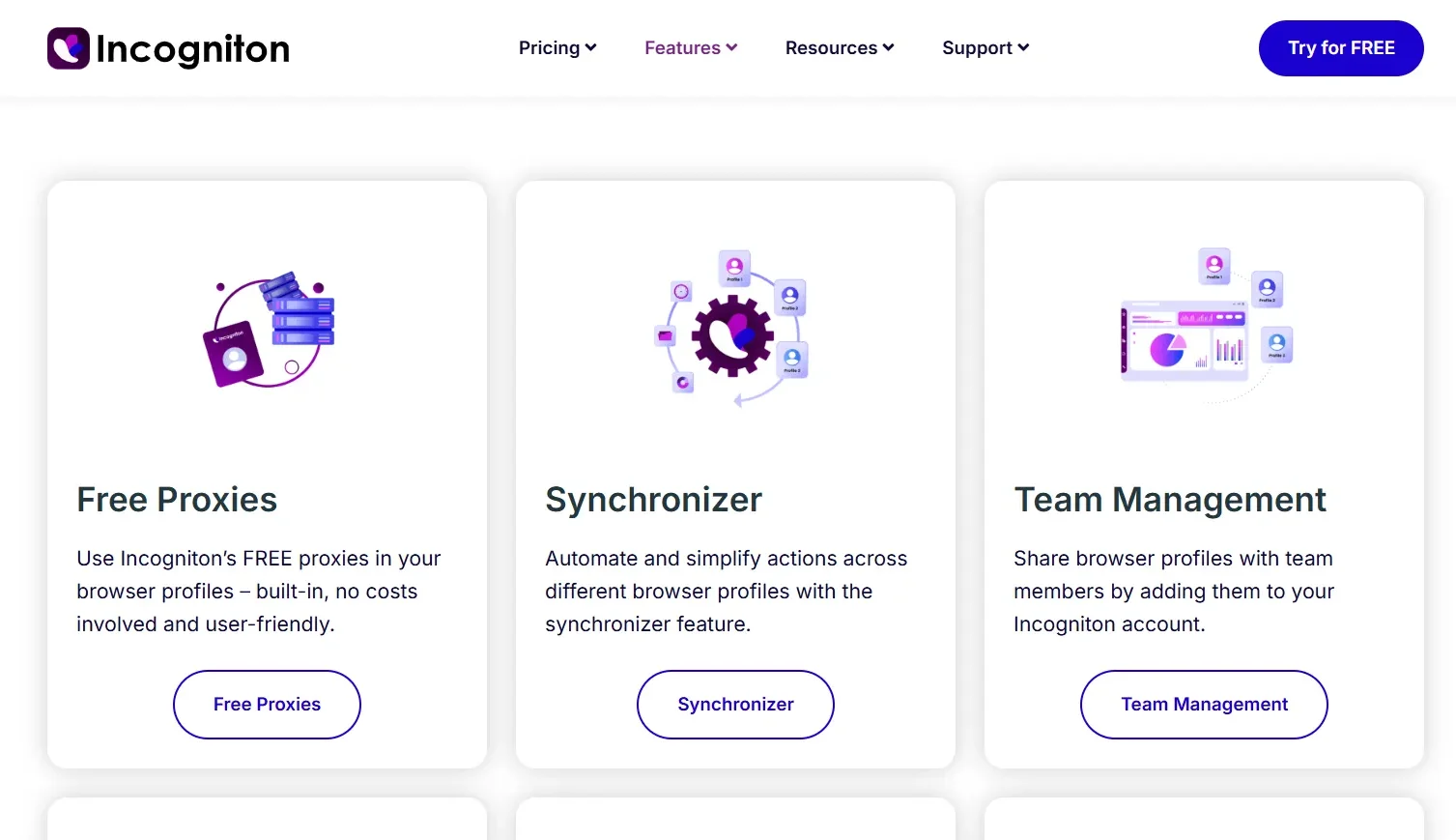
Incogniton is an anti-detect browser that lets you manage multiple browser profiles, each with its own digital fingerprint. This helps keep your online activities separate and reduces the chances of different accounts being linked to the same user. It’s particularly useful for managing multiple accounts, running advertising campaigns, and maintaining privacy while browsing.
To discreetly handle several internet personas, you must utilize additional software. In the past, people used VPNs, proxies, or even just Incognito mode on their browsers. Incogniton brings all these use case scenarios together and gives you a unified browsing experience that encompasses almost any kind of undetected browsing purpose.
Interface & Usability
Incogniton appears to be more of a “Conventional old-school” browser for multiple accounts at first appearance. A strong technical background is necessary. It appears as though Incogniton’s interface was lifted verbatim from an outdated version of another browser, which hasn’t been altered since. Once you get the hang of its UI, the free Incogniton Antidetect browser can be a good fit for you.
Summary:
- Mass Profile Actions: Allows seamless working with multiple profiles.
- Group Browser Profiles: Multiple profiles can be grouped into folders with customizable team permission options.
- Table of Profiles: A summarized profile view that is quite primitive but can be customized.
- Human Type-in: A previously unique feature that allows one to imitate real human typing when filling out website forms.
- Manage Extensions & Bookmarks: This is A useful option, but the interface for this is slightly outdated.
- No Mobile or Web version: A major drawback here is that users can’t remotely access Incogniton due to the absence of a mobile web version or dedicated app.
Data Safety & Privacy Policy
Incogniton maintains complete transparency regarding data collection/retention. Their privacy policy mentions that they collect information that a user voluntarily provides, such as usernames, email IDs, dates of birth, IP addresses, etc. However, they further assure that this information is processed for legitimate business purposes and to protect Incogniton’s services.
When it comes to personal data protection, Incogniton states that it has implemented appropriate technical and organizational security measures to protect your personal information. However, it still cannot guarantee 100% security.
To be fair, it is actually a wise approach on their part to be honest about the potential of modern hackers and cybercriminals and their abilities to bypass security measures and gain access to personal information. So their honesty that they cannot promise or guarantee that they (Hackers) will not be able to defeat their security and improperly access your information is worth some appreciation because their concern is realistic.
Plans & Pricing
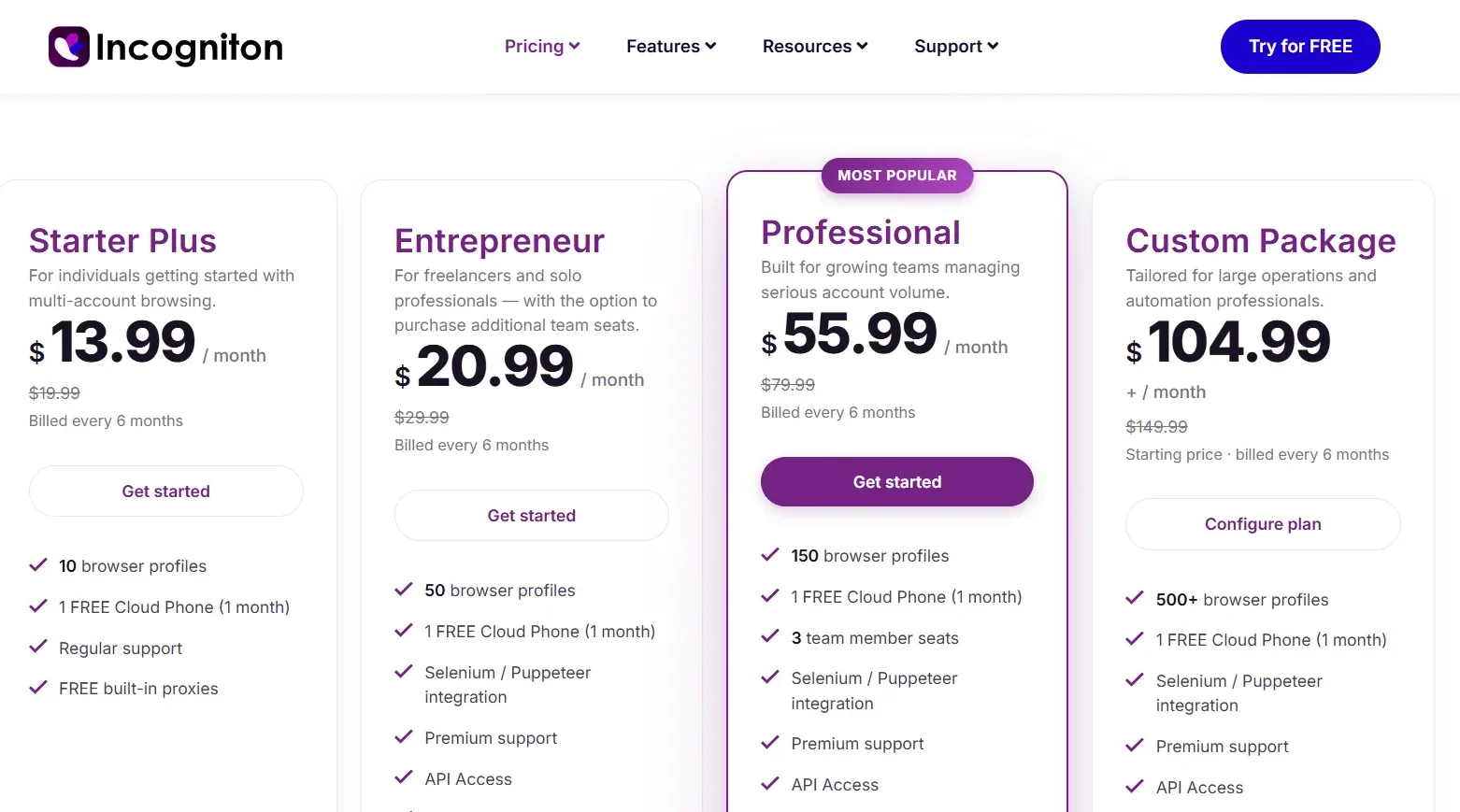
Incogniton prices its plans mostly by the number of browser profiles you need, and it currently lists four on its Incogniton pricing page. The prices below are the monthly rates shown when you pay every six months, which works out to about 30% below the crossed-out regular price next to each plan. Prices change from time to time, so check the live page before you buy.
Starter Plus costs $13.99 per month, billed every six months (regular price shown as $19.99). It includes up to 10 browser profiles, regular support, free built-in proxies, and one free month of a cloud phone. It is aimed at individuals getting started with multi-account browsing.
Entrepreneur costs $20.99 per month (regular $29.99). It includes up to 50 browser profiles, premium support, API access, Selenium and Puppeteer integration, and the free cloud phone month. It is built for freelancers and solo professionals, with the option to buy extra team seats.
Professional, marked as the most popular plan, costs $55.99 per month (regular $79.99). It includes up to 150 browser profiles, 3 team member seats, premium support, API access, Selenium and Puppeteer integration, and the cloud phone month. It is meant for growing teams managing a lot of accounts.
Custom Package starts at $104.99 per month (regular $149.99), billed every six months. It covers 500 or more browser profiles, premium support, API access, and Selenium and Puppeteer integration, plus the cloud phone month, and you configure the plan to fit your operation. It suits large operations and automation work.
Incogniton also shows a Try for FREE button in its site header, so it is worth checking what the current free trial includes before you pay.
Technical Support & Documentation
If you run into any issues regarding the browser, then you can get in touch with the Incogniton support team via Telegram and e-mail only. One major plus here is that since Telegram is a widely used IM application, you can expect a response from them very quickly. The Incogniton team also keeps posting updates on their Telegram channels. However, a dedicated phone number for contacting the support team would be great.
The documentation centre has adequate documents and videos. However, because Incogniton requires extensive manual changes to function, you will need some technical experience. As we previously stated, you should be thoroughly aware of what you want from the virtual browser profiles. Although there aren’t any tooltips for beginners, you will receive an email with the first set of instructions.
How do Anti-detect Browsers work?
A user can generate many browser instances, each with its own fingerprint, using anti-detect browsers. Websites can monitor users and collect personal data from their browsers by using browser fingerprinting. However, anti-detect browsers prevent tracking and thwart browser fingerprinting used by other websites by enabling numerous profiles to be segregated from one another.
Moreover, anti-detect browsers enable users to hide their digital identities and get over IP prohibitions by producing distinct digital fingerprints for every browser profile.
Are Anti-detect Browsers better than normal browsers?
In comparison to standard web browsers like Chrome, Firefox, or Safari, anti-detect browsers perform better in a number of areas, most notably security and user anonymity. Let’s quickly review a few of the advantages.
- Antidetect browsers make it more difficult for hackers to track down or target specific people by stopping search engines and websites from tracking user data, including IP addresses, browsing histories, and financial or personal information.
- Antidetect browsers help protect online advertising campaigns, maintain account integrity, and reduce the risk of financial losses for businesses
- Antidetect browsers allow users to browse the internet without leaving any digital trace, which makes it more difficult for websites and other online services to follow their activities or figure out who they really are.
- Antidetect browsers allow users to establish numerous virtual browser profiles, each with its own digital fingerprint that makes it challenging for websites to follow and observe people between profiles.
- Antidetect browsers enable users to smoothly access geo-restricted content by hiding their location and giving the impression that they are surfing from a different nation.
Also Read,
- Best Browsers to Use with a Proxy
- Best Antidetect Browsers
- Mozilla Firefox vs Google Chrome
- How to Fix Slow Chrome on a Laptop and Desktop?
Incogniton Anti-detect Browsers Pros & Cons
Pros
- Affordable Plans: A free tier and low-cost options make it accessible to beginners.
- Multiple Profiles: Manage numerous browser profiles from a single dashboard.
- Custom Settings: Adjust browser fingerprints to keep separate accounts from being easily linked.
- Automation Tools: Supports Selenium and Puppeteer on paid plans.
- Proxy Support: Works with HTTP, HTTPS, and SOCKS5 proxies.
Cons
- No Included Proxies: You must purchase and configure proxies separately.
- Fingerprinting Gaps: Some profiles may struggle with advanced detection tests, especially when using lower-quality proxies.
FAQs
Is Incogniton free?
Incogniton offers a Try for FREE option on its site, but its listed plans are paid and start at $13.99 per month when billed every six months. Trial terms and prices change, so check the pricing page before you sign up.
What is Incogniton used for?
People use it to run several accounts, each in its own profile with a separate fingerprint, for e-commerce, social media management, and affiliate work. Only use it on accounts you are allowed to operate, and follow each platform’s rules.
Do I need a proxy with Incogniton?
You can attach a proxy to each profile. Giving every profile its own IP address is what stops accounts from being linked by IP. Check whether your plan includes built-in proxies or whether you need to bring your own.
Incogniton Review – Final Thoughts!
Incogniton provides relevant features for anti-detect web browsing, helping manage multiple accounts and web automation.
- Pricing: The availability of a free plan makes Incogniton a feasible choice for users who are either on a budget crunch or just require a browser for very basic anti-detect browsing purposes.
- Operating System Compatibility: Incogniton currently only supports Windows and macOS and does not offer a mobile app or web version for mobile devices. This is a major drawback as it restricts using the browser on the go.
- Ease of use: The browser’s overall interface is decent, but it can be made a little more user-friendly for a better and seamless browsing experience.
The Incogniton browser is comparatively well-suited for handling several profiles and performing bulk activities on profiles. It is possible to aggregate multiple browser profiles into Folders that have sufficient team authorization settings.
