
Despite predictions that faxing would disappear years ago, it remains an important communication method across several industries. Healthcare organizations, law firms, financial institutions, government offices, and educational organizations still exchange documents by fax every day.
The difference is that most people no longer want to deal with an actual fax machine.
Physical machines require phone lines, paper, toner, maintenance, and someone nearby when something goes wrong. Online fax platforms solve that problem by allowing users to send and receive faxes through a browser, mobile app, desktop application, or email account.
Fax.Plus is one of the more established services in this category.
In this fax.Plus review, we’ll take a detailed look at its features, pricing, security standards, compliance options, integrations, limitations, and overall value. Whether you’re an individual who occasionally needs to fax documents or a business looking for a scalable online fax solution, this review should help you determine whether Fax.Plus is the right fit.
What Is Fax.Plus?
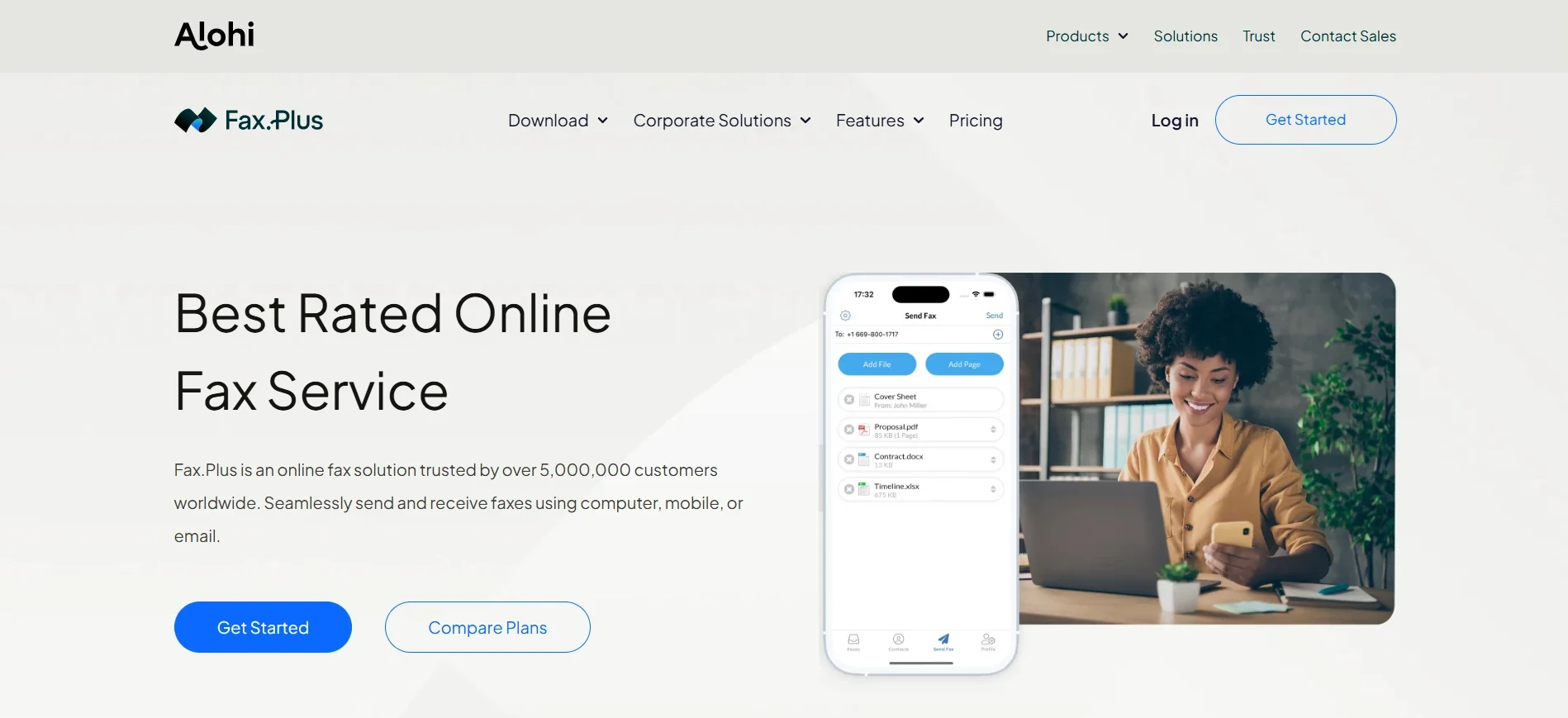
Fax.Plus is an online fax service developed by Alohi, a Swiss software company headquartered in Geneva. The company also operates several other business productivity products, including Sign.Plus for electronic signatures, Scan.Plus for mobile document scanning, and Dial.Plus for AI-powered phone solutions.
Rather than requiring a traditional fax machine or dedicated phone line, Fax.Plus allows users to send and receive faxes digitally.
You can access the service through:
- A web browser
- Desktop applications
- iOS devices
- Android devices
- Email-to-fax functionality
According to Alohi, the platform serves more than 5 million users worldwide. Its listed customers include organizations and companies such as the United Nations, IBM, 3M, Airbus, and PwC.
Fax.Plus supports sending faxes to more than 180 countries and offers dedicated fax numbers in 48 countries.
The main purpose of the platform is straightforward: it gives businesses and individuals a way to continue using fax communication without maintaining outdated hardware.
That makes Fax.Plus particularly useful for organizations where faxing remains part of normal operations but purchasing and maintaining physical machines no longer makes sense.
Fax.Plus Review: Key Features
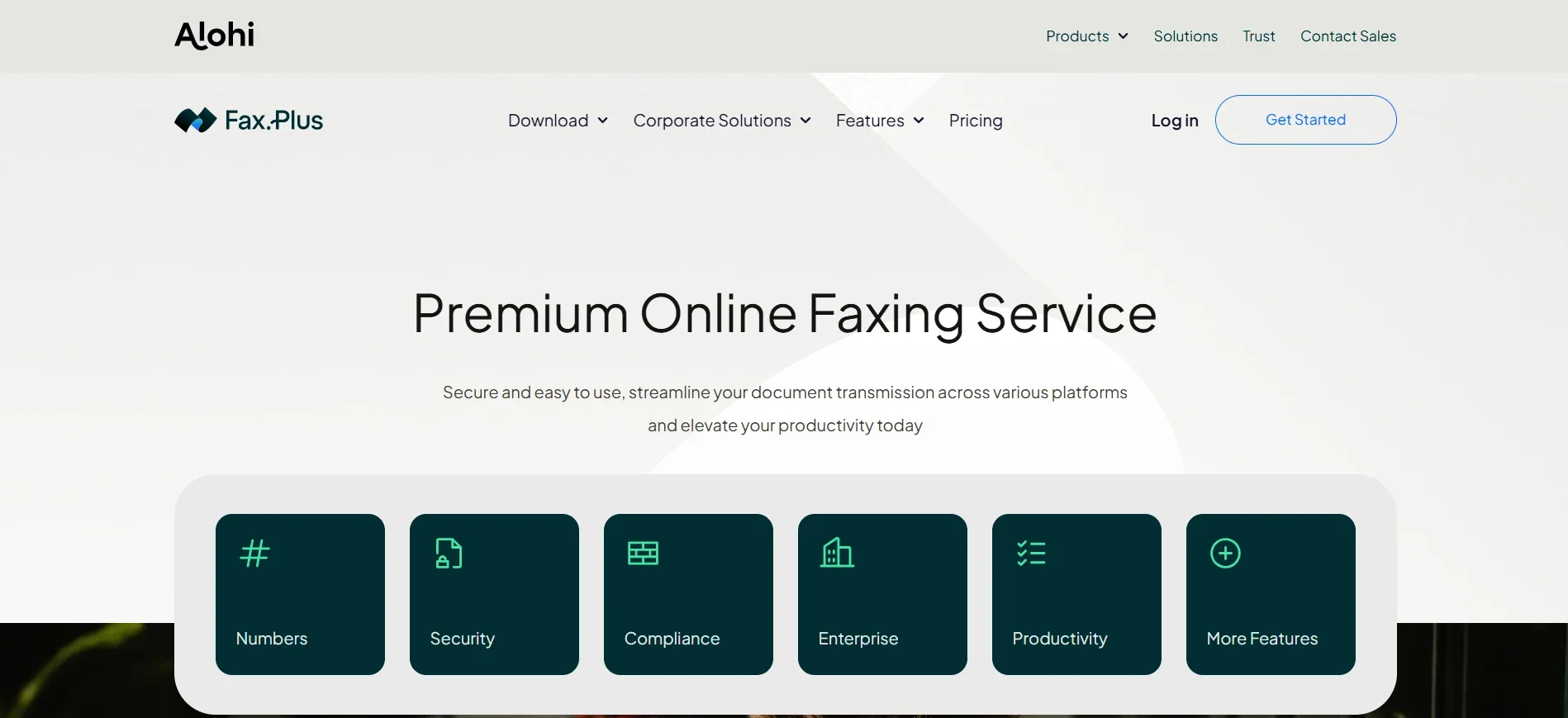
Fax.Plus offers considerably more functionality than simply uploading a PDF and sending it to a fax number. Its feature set is designed around businesses that need recurring, reliable document transmission.
Here are the main features worth knowing about.
Send and Receive Faxes from Multiple Devices
One of the strongest aspects of Fax.Plus is its flexibility. You aren’t restricted to a single device or operating system. The platform can be used from a web browser, desktop computer, smartphone, or email account.
That means you can start a workflow in one place and continue it somewhere else. For example, an employee might receive a fax notification by email, review the document on their phone, and later send a response through the desktop application.
This kind of flexibility is particularly useful for distributed teams and businesses where employees don’t always work from the same physical office.
Email to Fax
Email-to-fax is arguably one of the most convenient features offered by Fax.Plus.
Instead of opening a separate application every time you need to send something, you can compose an email, attach the document, and send it to the recipient’s fax number through the service.
Incoming faxes can also be delivered to your email inbox. For many businesses, this removes much of the friction normally associated with online faxing. Employees don’t need to constantly log into another dashboard or remember a separate workflow.
Everything can happen from a tool they already use throughout the day. Fax.Plus also offers HIPAA-compliant email-to-fax functionality for organizations that require additional protections for sensitive healthcare information.
Print to Fax
Another useful productivity feature is print-to-fax. On supported Windows and macOS applications, users can send documents directly from the system print menu.
The workflow feels similar to printing a document to a physical printer. Instead of selecting a printer, you choose the Fax.Plus option. This is a small feature, but it can make a noticeable difference for office workers who regularly process documents.
Rather than downloading a file, opening another application, uploading it, and then sending it, the faxing process can happen directly from the software where the document is already open.
Dedicated Fax Numbers
Paid Fax.Plus plans include access to dedicated fax numbers. Users can search for numbers based on cities, regions, or area codes instead of manually sorting through long lists.
This is useful for businesses that want to maintain a local presence in a specific region. Depending on the plan, users can also access toll-free numbers.
If your organization already has an established fax number, Fax.Plus supports number porting on eligible plans. This can be important because changing a business fax number may require notifying clients, partners, vendors, and government agencies. Porting the existing number avoids that disruption.
AI-Powered Fax Tools
Fax.Plus has also introduced AI-powered tools designed to make incoming documents easier to process. These features include AI text transcription and data extraction.
Instead of manually reading through every scanned document, businesses can use these tools to convert fax content into searchable text or extract structured information.
This could be useful for organizations processing:
- Forms
- Applications
- Scanned records
- Handwritten documents
- Repetitive administrative paperwork
AI credits are included with paid plans, although the amount varies depending on the subscription tier. The Enterprise plan provides 1,000 AI credits per month, while lower plans receive smaller one-time allocations. For businesses dealing with high document volumes, this could potentially save significant administrative time.
Integrations
Integrations are another area where Fax.Plus goes beyond basic online fax services.
The platform connects with Google Workspace, allowing users to work with services such as:
- Gmail
- Google Drive
- Google Docs
- Google Sheets
Microsoft integrations are also available, including support for Microsoft Word and Teams. Business and Enterprise users can access Slack integration.
Enterprise customers receive additional integration options, including Zapier and a programmable Fax API. The API is particularly useful for larger organizations that want to integrate fax functionality directly into internal software or automated workflows.
Fax.Plus also supports several cloud storage services across paid plans, including:
- Google Drive
- iCloud Drive
- OneDrive
- Dropbox
- Box
This makes document storage and retrieval easier for teams already using cloud-based workflows.
Fax Broadcasting
Businesses sometimes need to send the same document to a large number of recipients.
Fax.Plus supports fax broadcasting for this purpose. Users can send a single document to as many as 500 recipients and track the delivery status of individual transmissions.
This could be useful for organizations distributing:
- Policy updates
- Legal notices
- Administrative documents
- Client communications
- Internal announcements
Instead of manually sending hundreds of individual faxes, the broadcasting feature allows users to manage the process from a single workflow.
Scheduled Faxing
Fax.Plus also supports scheduled fax delivery. Rather than sending a document immediately, users can choose a specific date and time for transmission.
This can be useful when working across different time zones or when documents need to be delivered at a particular point in a business process. For example, a team preparing documents late at night could schedule them for delivery during the recipient’s normal business hours.
Cover Sheets
Users can select from pre-formatted cover sheets or create customized versions. Sender and recipient details can be automatically included, reducing repetitive data entry.
While cover sheets may seem like a relatively basic feature, they remain important in industries where fax communication follows formal documentation procedures.
Fax.Plus vs. Traditional Fax Machines
The biggest reason businesses move to online faxing is convenience. Traditional fax machines come with a surprising number of small frustrations.
You may need:
- A dedicated phone line
- Paper
- Toner or ink
- Hardware maintenance
- Physical office access
- Someone available to handle paper jams or transmission problems
Fax.Plus removes most of these requirements.
Documents can be uploaded digitally, sent from anywhere, and stored electronically.
You can also check transmission status without standing next to a machine.
This is particularly valuable for remote teams.
A traditional fax machine is tied to a physical location. An online fax service allows employees to access the same functionality from almost anywhere with an internet connection.
The tradeoff is that you’re now relying on a subscription service and the provider’s infrastructure rather than equipment under your direct physical control.
For most modern businesses, however, the convenience of digital faxing outweighs the disadvantages of maintaining old hardware.
Getting Started With Fax.Plus
Setting up Fax.Plus is relatively straightforward. You create an account, select a plan, and choose a fax number if your subscription includes one.
The service also offers a free option that allows new users to test the platform before paying. Once the account is ready, there are several ways to send a fax.
You can:
- Upload a document through the web application.
- Send a document through email-to-fax.
- Use the desktop application.
- Fax directly through the print menu on supported devices.
New users also receive a welcome fax from Alohi that helps introduce the platform’s core functionality. This is a small onboarding detail, but it’s useful for people who have never used an online fax service before.
Overall, the setup process is simple enough that most users should be able to send their first fax within a few minutes.
Fax.Plus Pricing Breakdown
Pricing is one of the most important considerations when choosing an online fax service.
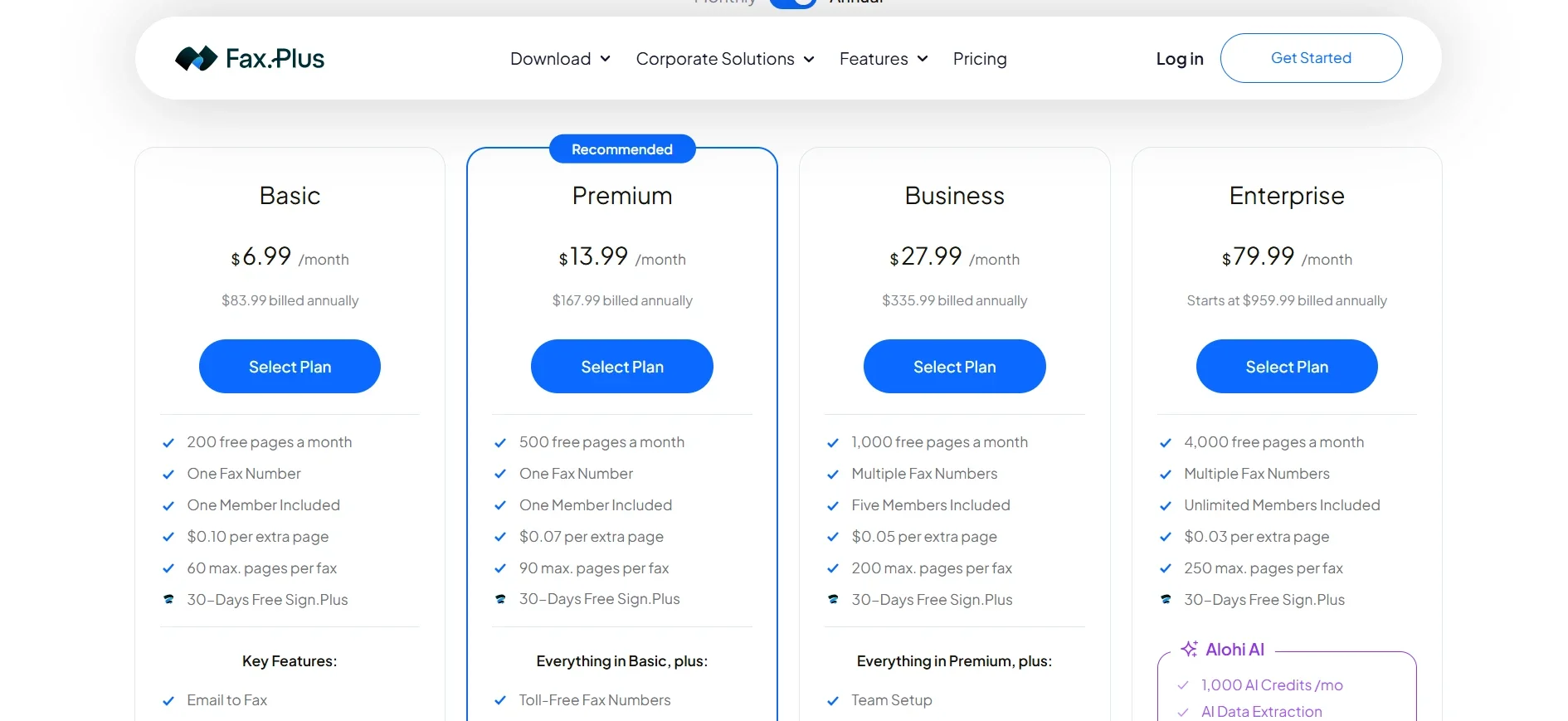
Fax.Plus uses a page-based subscription model. Each plan includes a monthly page allowance, with additional charges applying if you exceed the included limit.
Here’s how the pricing structure works.
Free Plan
The free plan allows users to send a total of 10 fax pages without entering payment information.
It is mainly designed for testing the service.
The free plan does not include:
- Fax receiving
- A dedicated fax number
If you only need to confirm that the service works for a particular recipient, the free tier can be useful.
However, it isn’t designed for ongoing business use.
Basic Plan – $6.99 Per Month
The Basic plan costs $6.99 per month or $83.99 when billed annually.
It includes:
- 200 free pages per month
- One dedicated fax number
- One team member
- $0.10 per additional page
- Up to 60 pages per individual fax
- Email-to-fax functionality
- Mobile app access
- Unlimited fax storage
- Multiple recipients
For individuals and solo professionals with moderate faxing needs, this is the most affordable long-term option.
Premium Plan – $13.99 Per Month
The Premium plan costs $13.99 per month or $167.99 annually.
It includes:
- 500 free pages per month
- $0.07 per additional page
- Up to 90 pages per fax
It also adds features such as:
- Toll-free numbers
- Number porting
- CSV log exports
- The ability to temporarily disable fax reception
Premium makes more sense for users with higher document volumes or businesses that need additional number management features.
Business Plan – $27.99 Per Month
The Business plan costs $27.99 per month or $335.99 annually.
It includes:
- 1,000 free pages per month
- Multiple fax numbers
- Five team members
- $0.05 per additional page
- Up to 200 pages per fax
- Team management
- Admin controls
- Slack integration
This is where Fax.Plus begins to look more like a proper team collaboration platform rather than simply an individual online fax account.
The included admin console can be useful for organizations that need centralized management over multiple users.
Enterprise Plan – Starting at $79.99 Per Month
The Enterprise plan starts at $79.99 per month and can scale depending on volume and business requirements.
It includes:
- 4,000 free pages per month
- Unlimited team members
- $0.03 per additional page
- Up to 250 pages per fax
- 1,000 monthly AI credits
- Single sign-on
- HIPAA compliance with a signed Business Associate Agreement
- Fax API access
- Data residency options
- Zapier integration
- Advanced security controls
- Access logging
- Analytics
- Multi-admin support
The Enterprise plan is clearly designed for organizations with more complex operational and compliance requirements.
Annual Billing
Annual billing reduces the effective monthly cost by roughly 20% to 22% depending on the plan.
Alohi also advertises promotions that can include additional free months for annual subscriptions.
Businesses should compare monthly and annual pricing carefully before committing. Annual billing can provide meaningful savings, but only if you’re confident the chosen plan matches your long-term page volume.
Additional Fax Numbers and Add-Ons
Additional dedicated fax numbers cost $4.99 per month beyond the numbers included with eligible plans. Vanity numbers cost $19.99 as a one-time fee.
Number porting itself is free, although availability and plan requirements may vary by country. Businesses with unusually high fax volumes can also contact Fax.Plus for custom pricing.
Security and Compliance
Security is one of the areas where Fax.Plus places significant emphasis.
For organizations transmitting contracts, financial records, medical information, or other sensitive documents, basic convenience isn’t enough.
Fax.Plus uses 256-bit AES encryption for stored documents and TLS 1.2+ encryption for data transmitted between users and the company’s infrastructure.
Each user is assigned a unique encryption key. Two-factor authentication is available across all plans, including the free tier.
On the compliance side, Fax.Plus lists several security and privacy standards, including:
- ISO 27001
- SOC 2 Type II
- GDPR
- CCPA
- PCI DSS
HIPAA and PHIPA compliance are available at the Enterprise level.
For organizations handling protected health information, the most important detail is the Business Associate Agreement.
Fax.Plus includes a signed BAA with its Enterprise plan. This is worth highlighting because businesses shouldn’t assume that simply using an encrypted fax service automatically makes their workflow HIPAA compliant.
The contractual and operational requirements matter as much as the technology itself.
Because Alohi is headquartered in Switzerland, the company also references Swiss data protection standards.
Enterprise customers can access data residency options across more than 40 regions, including locations such as:
- United States
- Canada
- Australia
- Japan
- Switzerland
For multinational organizations, this can be valuable when internal policies or regulations require data to remain in particular regions. For healthcare organizations, understanding the broader requirements around HIPAA compliance is important before choosing a communication platform. The U.S. Department of Health and Human Services HIPAA guidance provides an official overview of the responsibilities and requirements surrounding the protection of sensitive health information.
Industries That Can Benefit From Fax.Plus
Fax.Plus is designed broadly enough to work for many businesses, but some industries are more likely to benefit from it than others.
Healthcare
Healthcare remains one of the strongest use cases for online faxing.
Providers frequently exchange:
- Patient records
- Referrals
- Prescriptions
- Administrative documents
The Enterprise-only HIPAA option is important here. Smaller healthcare organizations may find the Enterprise pricing expensive if they don’t need unlimited users or thousands of monthly pages.
However, businesses requiring a signed BAA need to factor that requirement into their decision from the beginning.
Legal Services
Law firms and legal departments often deal with formal documentation where proof of transmission matters.
Fax confirmation reports can provide evidence that a document was successfully transmitted.
Potential use cases include:
- Contracts
- Court-related filings
- Client documents
- Time-sensitive legal communications
For legal professionals, reliable delivery tracking can be more important than the convenience features aimed at casual users.
Financial Services
Financial institutions still process a large amount of documentation. Loan applications, account paperwork, compliance documents, and other records may need to move between organizations that still rely on fax communication.
The platform’s security certifications and PCI DSS-related standards may be relevant for businesses operating in this environment.
Education
Schools and universities may use faxing for:
- Enrollment records
- Transcripts
- Administrative documents
- Inter-institutional communication
While many educational institutions have adopted modern digital systems, faxing remains part of the workflow in some organizations.
Real Estate and Technology Companies
Real estate businesses may use faxing for property-related paperwork and transaction documentation. Technology companies, meanwhile, may benefit more from Fax.Plus integrations. The API and automation capabilities can make fax communication part of a larger internal software workflow.
Customer Support and the Alohi Ecosystem
Fax.Plus provides support primarily through its contact system and help center.
The company also maintains a public status page, which can be useful when you’re trying to determine whether a transmission problem is related to your account or a broader service issue.
The help documentation covers topics such as:
- Number porting
- Sending faxes
- Receiving documents
- Troubleshooting failed transmissions
- Account management
One noticeable limitation is the lack of live chat support. For routine questions, this may not matter. However, businesses dealing with an urgent transmission issue may prefer a service that provides real-time support. Another point worth understanding is how Fax.Plus fits into the larger Alohi ecosystem.
Scanning documents happens through Scan.Plus. Electronic signatures are handled through Sign.Plus. That means users who need to photograph, sign, and fax documents from a mobile device may need multiple applications.
For users who primarily work with existing PDFs, this probably won’t be a problem. But for field workers or mobile professionals, switching between different apps can create unnecessary friction.
Who Should Use Fax.Plus?
Fax.Plus is not equally suited to every type of user. The platform makes the most sense for certain groups.
Healthcare Organizations That Need Enterprise Compliance
Healthcare providers requiring HIPAA-compliant workflows and a signed BAA can use the Enterprise plan.
The main consideration is cost. Smaller practices should carefully determine whether the Enterprise price fits their budget.
Solo Professionals
Individuals who regularly send contracts, forms, or business documents can benefit from the Basic plan.
Email-to-fax functionality is especially convenient for people who don’t want another application in their daily workflow.
Small Teams
The Business plan can be useful for organizations with several employees who need shared access and administrative controls. The included five team members make it more practical than purchasing multiple individual accounts.
International Businesses
Companies communicating across multiple countries may appreciate the platform’s international coverage. The ability to send faxes to more than 180 countries and access dedicated numbers in multiple locations gives Fax.Plus an advantage for globally distributed organizations.
Google Workspace and Microsoft Users
Businesses already working heavily inside Google or Microsoft ecosystems may find the integrations particularly useful. Being able to send documents without constantly switching between platforms can simplify routine administrative tasks.
Choosing the right business software often means looking beyond marketing claims and comparing pricing, features, security, and real-world usability. Our in-depth Proxys.io review follows a similar approach by examining whether a service delivers enough value for its intended users.
The Biggest Advantages of Fax.Plus
After examining the platform in detail, several strengths stand out.
Strong Cross-Platform Availability
Fax.Plus works through browsers, desktop applications, mobile devices, and email.
This makes it easier to build faxing into existing workflows rather than forcing employees into a single system.
Useful Integrations
The Google Workspace, Microsoft, Slack, Zapier, and API options give the service room to scale beyond basic document transmission.
Solid Security Position
The combination of encryption, two-factor authentication, ISO 27001, SOC 2 Type II, and other listed compliance standards gives Fax.Plus a stronger security profile than many low-cost alternatives.
International Coverage
Businesses with international operations can send faxes broadly and access dedicated numbers in multiple countries.
Advanced Features
Scheduled faxing, broadcasting, AI-powered document processing, and confirmation reporting provide more functionality than a basic online fax service.
Free Testing Option
The 10-page free allowance gives users an opportunity to test the platform before paying for a subscription.
That’s particularly useful when you simply need to verify whether online faxing will work with a particular recipient or workflow.
Where Fax.Plus Falls Short
No service is perfect, and there are several limitations worth considering.
HIPAA Compliance Is Expensive for Small Organizations
The most obvious issue is that HIPAA compliance with a signed BAA is limited to the Enterprise plan.
At $79.99 per month, this may be difficult to justify for small clinics or solo healthcare professionals with relatively low fax volumes.
A lower-priced HIPAA-focused plan could make the service more accessible.
Some Features Are Split Across Multiple Apps
Fax.Plus is part of the Alohi product ecosystem. That’s helpful if you already use the company’s other tools. However, users who need scanning, signing, and faxing may have to switch between Scan.Plus, Sign.Plus, and Fax.Plus. A more unified mobile workflow would be more convenient.
No Live Chat Support
The help center appears comprehensive, but real-time support is not available through live chat. This could be frustrating during urgent document transmission problems.
Enterprise Features May Be Overkill for Some Teams
Several advanced capabilities, including the API, Zapier integration, shared contacts, and multi-admin controls, are reserved for Enterprise customers. A medium-sized team might only need one of those features but still have to upgrade to the highest tier. This creates a gap between the Business and Enterprise plans.
Overage Charges Can Add Up
Fax.Plus uses monthly page limits. If your fax volume fluctuates significantly, estimating usage can be difficult. Going over the included allowance results in additional per-page charges. Businesses with unpredictable volumes should compare this model against competitors offering unlimited or flat-rate pricing.
How Does Fax.Plus Compare with Other Online Fax Services?
The online fax market generally includes two types of providers.
The first group focuses on affordability and simplicity.
These services often offer low monthly prices but fewer integrations, security certifications, and compliance features.
The second group focuses on enterprise customers.
These platforms tend to offer stronger administrative controls and integrations but can be expensive and complicated to purchase.
Fax.Plus sits somewhere between those two categories.
You can create an account without speaking to a sales representative and test the service through the free tier.
At the same time, the Enterprise plan includes advanced functionality such as:
- Single sign-on
- API access
- Data residency
- Advanced security controls
- HIPAA compliance
- Team administration
This flexibility is one of the platform’s strongest advantages.
The downside is that the page-based pricing model may not work for everyone.
Businesses with highly variable usage could end up paying more than expected.
Before subscribing, it’s worth estimating your actual monthly fax volume rather than choosing a plan based only on the starting price.
Fax.Plus Review: Is It Worth It?
Overall, Fax.Plus is a capable and well-rounded online fax platform. Its biggest strengths are flexibility, security, international coverage, and integration options.
You can send and receive faxes from multiple devices, work directly from email, integrate with major productivity platforms, and access advanced enterprise features when needed. The service also provides useful extras such as scheduled faxing, broadcasting, AI-powered document processing, and confirmation reports.
For individuals and small businesses, the Basic and Premium plans offer a reasonable balance between price and functionality.
For teams, the Business plan adds administrative features and multi-user access.
Enterprise customers receive the most advanced capabilities, including HIPAA compliance with a signed BAA.
The biggest concern is pricing for smaller regulated organizations.
A solo healthcare provider may need the Enterprise plan solely because of compliance requirements while having little use for thousands of included pages or unlimited team members.
That’s an expensive jump.
The separate Alohi applications can also make the mobile workflow feel less streamlined than an all-in-one solution. Still, if your organization regularly sends and receives faxes and wants to eliminate physical machines, Fax.Plus is a strong option.
Frequently Asked Questions
Is Fax.Plus free?
Fax.Plus offers a free plan that allows users to send a total of 10 fax pages without entering payment information. The free tier is mainly intended for testing. It does not include fax receiving or a dedicated fax number. Paid plans start at $6.99 per month.
Is Fax.Plus HIPAA compliant?
Fax.Plus supports HIPAA-compliant faxing, but the required compliance features and signed Business Associate Agreement are included with the Enterprise plan. Lower subscription tiers do not provide the same BAA-based HIPAA coverage. Organizations handling protected health information should confirm their specific compliance requirements before choosing a plan.
Can I keep my existing fax number?
Yes, Fax.Plus supports number porting on eligible plans. Premium and higher plans can access this feature, although requirements may vary depending on the country. US and Canadian number porting requires at least the Premium plan.
Do I need a fax machine to use Fax.Plus?
No. Fax.Plus works digitally through a browser, mobile app, desktop application, or email. You don’t need a physical fax machine, dedicated phone line, paper, or toner.
What happens if I exceed my monthly page allowance?
Additional pages are charged based on your subscription tier. The overage rate decreases as you move to higher plans. For example, Basic users pay $0.10 per additional page, while Enterprise users pay $0.03 per additional page.
Can multiple employees use Fax.Plus?
Yes. The Business plan includes five team members and administrative controls. Enterprise supports unlimited team members along with more advanced management options. Basic and Premium plans are primarily designed for individual users.
Is Fax.Plus available internationally?
Yes. Fax.Plus supports sending faxes to more than 180 countries and offers dedicated fax numbers in 48 countries. This makes it suitable for businesses with international communication requirements.
How do I know whether a fax was successfully delivered?
Fax.Plus provides confirmation reports for sent faxes. If a transmission fails, the status is reflected in your account, and users can receive email notifications. This makes it easier to verify delivery without manually checking a physical machine.
Does Fax.Plus offer annual discounts?
Yes. Annual billing reduces the effective monthly cost compared with month-to-month subscriptions. The savings generally work out to approximately 20% to 22%, depending on the plan. The company may also offer promotional incentives for annual subscriptions.
Which Fax.Plus Plan Should You Choose?
Choosing between Fax.Plus plans doesn’t need to be complicated. The most important question is whether you have a compliance requirement. If your organization needs HIPAA compliance with a signed BAA, the Enterprise plan is the relevant option.
There’s little value in comparing lower plans purely based on price if they don’t meet your regulatory requirements. For everyone else, monthly fax volume is usually the deciding factor.
The Basic plan is suitable for individuals and low-volume users.
Premium makes sense for users who need more pages, toll-free numbers, or number porting.
Business is better for teams that need centralized administration and multiple users.
Enterprise is designed for organizations that need advanced integrations, security controls, compliance support, or large-scale usage.
One important tip is to estimate your actual fax volume before committing to annual billing. Remember to include cover pages in your calculations. Underestimating usage can result in unexpected overage charges, while choosing an unnecessarily large plan means paying for capacity you never use.
Final Thoughts on This Fax.Plus Review
Fax.Plus is one of the more complete online fax platforms available for businesses that need more than occasional document transmission.
It combines browser-based faxing, mobile access, email-to-fax, desktop tools, integrations, international coverage, and enterprise-grade security features in a single service.
The platform isn’t perfect.
The Enterprise-only HIPAA model may be too expensive for smaller healthcare organizations, some workflows require switching between Alohi’s separate applications, and the absence of live chat support may frustrate users with urgent issues.
However, the overall package is strong.
If you’re an individual or small business that occasionally needs to send professional documents, the Basic or Premium plans should cover most requirements without the cost of maintaining physical hardware.
If you’re running a larger organization that needs team management, integrations, security controls, or compliance features, Fax.Plus offers a much broader set of capabilities.
The bottom line is simple: Fax.Plus is worth considering if you want a modern, flexible alternative to traditional fax machines and need a platform capable of growing from occasional document transmission to enterprise-level workflows.
Before choosing a plan, take advantage of the free allowance, track your real fax volume, and make sure the compliance and integration features you need are available at the subscription tier you’re considering.
